Monitoring & Observability
This guide covers monitoring Milvaion in production, including health checks, metrics, logging, and alerting.
Health Checks
API Health Endpoints
| Endpoint | Purpose | Use For |
|---|---|---|
/health/live | Is the process running? | Kubernetes liveness probe |
/health/ready | Are dependencies healthy? | Kubernetes readiness probe |
/health | Full health with details | Debugging, dashboards |
Liveness Check
curl http://localhost:5000/api/v1/healthcheck/live
Response:
{
  "status": "Healthy",
  "timestamp": "2026-01-14T17:55:12.5466734Z",
  "uptime": "16.05:34:46.9359664"
}
Readiness Check
curl http://localhost:5000/api/v1/healthcheck/ready
Response:
{
  "status": "Healthy",
  "duration": "00:00:00.0015505",
  "timestamp": "2026-01-14T17:55:39.7914455Z",
  "checks": [
    {
      "name": "PostgreSQL",
      "status": "Healthy",
      "description": "PostgreSQL database connection is healthy",
      "duration": "00:00:00.0014398",
      "tags": [
        "database",
        "sql"
      ],
      "data": {
        "DatabaseName": "MilvaionDb",
        "ConnectionStatus": "Connected",
        "ProviderName": "Npgsql.EntityFrameworkCore.PostgreSQL"
      }
    },
    {
      "name": "Redis",
      "status": "Healthy",
      "description": "Redis connection is healthy",
      "duration": "00:00:00.0004801",
      "tags": [
        "redis",
        "cache"
      ],
      "data": {
        "ConnectionStatus": "Connected",
        "Database": "0"
      }
    },
    {
      "name": "RabbitMQ",
      "status": "Healthy",
      "description": "RabbitMQ connection is healthy",
      "duration": "00:00:00.0000037",
      "tags": [
        "rabbitmq",
        "messaging"
      ],
      "data": {
        "ConnectionStatus": "Connected",
        "Host": "rabbitmq",
        "Port": "5672",
        "IsOpen": "True"
      }
    }
  ]
}
Kubernetes Probes
spec:
  containers:
    - name: api
      livenessProbe:
        httpGet:
          path: /api/v1/healthcheck/live
          port: 8080
        initialDelaySeconds: 30
        periodSeconds: 10
        failureThreshold: 3
      readinessProbe:
        httpGet:
          path: /api/v1/healthcheck/ready
          port: 8080
        initialDelaySeconds: 10
        periodSeconds: 5
        failureThreshold: 3
Worker Health
Workers support two health check approaches: file-based (for Console Workers) and HTTP endpoint-based (for API Workers).
Configuration
Enable health checks in appsettings.json:
{
  "Worker": {
    "HealthCheck": {
      "Enabled": true,
      "LiveFilePath": "/tmp/live", // Only for file health check. (for console workers)
      "ReadyFilePath": "/tmp/ready", // Only for file health check. (for console workers)
      "IntervalSeconds": 30
    }
  }
}
| Setting | Default | Description |
|---|---|---|
Enabled | false | Enable/disable health checks |
LiveFilePath | /tmp/live | File path for liveness probe |
ReadyFilePath | /tmp/ready | File path for readiness probe |
IntervalSeconds | 30 | Health check interval |
Option 1: Console Worker (File-Based)
For workers without HTTP endpoints, use AddFileHealthCheck():
using Microsoft.Extensions.Hosting;
using Milvasoft.Milvaion.Sdk.Worker;

var builder = Host.CreateApplicationBuilder(args);

// Register Worker SDK
builder.Services.AddMilvaionWorkerWithJobs(builder.Configuration);

// Add file-based health checks (Redis + RabbitMQ)
builder.Services.AddFileHealthCheck(builder.Configuration);

var host = builder.Build();
await host.RunAsync();
Kubernetes probes:
spec:
  containers:
    - name: worker
      livenessProbe:
        exec:
          command: ["test", "-f", "/tmp/live"]
        initialDelaySeconds: 30
        periodSeconds: 30
        failureThreshold: 3
      readinessProbe:
        exec:
          command: ["test", "-f", "/tmp/ready"]
        initialDelaySeconds: 10
        periodSeconds: 10
        failureThreshold: 3
Docker Compose healthcheck:
worker:
  healthcheck:
    test: ["CMD", "test", "-f", "/tmp/live"]
    interval: 30s
    timeout: 5s
    retries: 3
    start_period: 30s
Option 2: API Worker (HTTP Endpoints)
For workers with HTTP endpoints, use AddHealthCheckEndpoints() and UseHealthCheckEndpoints():
using Milvasoft.Milvaion.Sdk.Worker;
using Milvasoft.Milvaion.Sdk.Worker.HealthChecks;

var builder = WebApplication.CreateBuilder(args);

// Add health checks (Redis + RabbitMQ)
builder.Services.AddHealthChecks()
                .AddCheck<RedisHealthCheck>("Redis", tags: ["redis", "cache"])
                .AddCheck<RabbitMQHealthCheck>("RabbitMQ", tags: ["rabbitmq", "messaging"]);

// Register Worker SDK
builder.Services.AddMilvaionWorkerWithJobs(builder.Configuration);

// Register health check endpoint services
builder.Services.AddHealthCheckEndpoints(builder.Configuration);

var app = builder.Build();

// Map health check endpoints
app.UseHealthCheckEndpoints(builder.Configuration);

await app.RunAsync();
Available endpoints:
| Endpoint | Purpose | Response |
|---|---|---|
/health | Simple check | "Ok" |
/health/live | Liveness probe | { status, timestamp, uptime } |
/health/ready | Readiness probe | { status, duration, checks[] } |
/health/startup | Startup probe | { status, timestamp, uptime } |
Kubernetes probes:
spec:
  containers:
    - name: api-worker
      livenessProbe:
        httpGet:
          path: /health/live
          port: 8080
        initialDelaySeconds: 30
        periodSeconds: 10
        failureThreshold: 3
      readinessProbe:
        httpGet:
          path: /health/ready
          port: 8080
        initialDelaySeconds: 10
        periodSeconds: 5
        failureThreshold: 3
      startupProbe:
        httpGet:
          path: /health/startup
          port: 8080
        initialDelaySeconds: 5
        periodSeconds: 5
        failureThreshold: 30
Health Check Behavior
The SDK includes built-in health checks for:
| Check | What it Verifies |
|---|---|
| Redis | Connection status via PING command |
| RabbitMQ | Connection status via IConnectionMonitor |
File-based health check logic:
- Live file exists: Worker process is running and not completely unhealthy
- Ready file exists: All health checks (Redis, RabbitMQ) are healthy
- Files are deleted on graceful shutdown
- Files are updated every
IntervalSeconds
Dashboard Metrics
Built-in Statistics
Access via Dashboard home or API:
curl http://localhost:5000/api/v1/dashboard
{
  "isSuccess": true,
  "statusCode": 200,
  "messages": [
    {
      "key": "",
      "message": "Operation successful!",
      "type": 1
    }
  ],
  "data": {
    "totalExecutions": 3546,
    "queuedJobs": 0,
    "completedJobs": 3513,
    "failedOccurrences": 32,
    "cancelledJobs": 1,
    "timedOutJobs": 0,
    "runningJobs": 0,
    "averageDuration": 2509.362653003131,
    "successRate": 99.06937394247038,
    "totalWorkers": 1,
    "totalWorkerInstances": 1,
    "workerCurrentJobs": 0,
    "workerMaxCapacity": 128,
    "workerUtilization": 0,
    "executionsPerMinute": 10,
    "executionsPerSecond": 0, // It means lower than 1
    "peakExecutionsPerMinute": 10
  },
  "metadatas": []
}
Resource Usage
How much CPU, memory and disk the API process itself is using. The system configuration endpoint returns these figures too, but only as one branch of a payload that also walks every configuration section, parses the connection strings and enumerates the alerting channels - so it is the wrong thing to poll. This endpoint reads the current process and nothing else.
curl http://localhost:5000/api/v1/admin/resource-usage
{
  "data": {
    "sampledAt": "2026-07-20T13:41:02Z",
    "hostName": "e5af1cd44f73",
    "processorCount": 8,
    "cpuUsagePercent": 3.4,
    "totalMemoryMB": 4096,
    "usedMemoryMB": 612,
    "availableMemoryMB": 3484,
    "memoryUsagePercent": 14.94,
    "processMemoryMB": 1180,
    "peakProcessMemoryMB": 1342,
    "totalAllocatedMB": 91422,
    "gen0Collections": 4821,
    "gen1Collections": 913,
    "gen2Collections": 26,
    "threadCount": 54,
    "uptime": "0.04:42:11",
    "totalDiskGB": 200,
    "availableDiskGB": 150,
    "diskUsagePercent": 25
  }
}
Three of these are worth reading together rather than separately:
usedMemoryMBis the managed heap.processMemoryMBis what the operating system - and a container memory limit - sees, and is always larger: it also holds the runtime, native allocations, loaded assemblies and thread stacks. A gap that keeps widening while the heap stays flat points at a native leak rather than a managed one.totalMemoryMBcomes from the garbage collector, so under a container limit it reports the limit rather than the host's physical memory. That is the number the process is actually judged against, which is what makesmemoryUsagePercentmeaningful in a container.gen2Collectionsrising quickly means objects are surviving long enough to be promoted, which is what memory pressure looks like before it becomes an out-of-memory failure.
cpuUsagePercent is an average over the process lifetime, not an instantaneous reading. A process
that was busy an hour ago and is idle now still reports a high figure.
If the counters cannot be read - which happens in a hardened container - every figure is zero and
collectionError explains why, rather than the response implying the process is idle.
To break memory down per background service, use /admin/diagnostics/services, which reports each
service's current usage, its growth since start, and whether a leak is suspected.
Worker Status
curl http://localhost:5000/api/v1/workers
[
  {
  "isSuccess": true,
  "statusCode": 200,
  "messages": [],
  "data": [
    {
      "workerId": "sample-worker",
      "displayName": "sample-worker (sample-worker-172a5243)",
      "routingPatterns": {
        "AlwaysFailingJob": "alwaysfailing.*",
        "LongRunningTestJob": "longrunningtest.*",
        "NonParallelJob": "nonparallel.*",
        "SendEmailJob": "sendemail.*",
        "TestJob": "test.*"
      },
      "jobNames": [
        "AlwaysFailingJob",
        "LongRunningTestJob",
        "NonParallelJob",
        "SendEmailJob",
        "TestJob"
      ],
      "currentJobs": 0,
      "status": "Active",
      "lastHeartbeat": "2026-01-14T18:04:52.0539333+00:00",
      "registeredAt": "2026-01-14T18:01:27.1426831+00:00",
      "version": "1.0.0.0",
      "metadata": "{\"ProcessorCount\":16,\"OSVersion\":\"Unix 6.6.87.1\",\"RuntimeVersion\":\"10.0.1\",\"JobConfigs\":[{\"JobType\":\"AlwaysFailingJob\",\"ConsumerId\":\"alwaysfailing-consumer\",\"MaxParallelJobs\":8,\"ExecutionTimeoutSeconds\":30},{\"JobType\":\"LongRunningTestJob\",\"ConsumerId\":\"longrunning-consumer\",\"MaxParallelJobs\":8,\"ExecutionTimeoutSeconds\":10},{\"JobType\":\"NonParallelJob\",\"ConsumerId\":\"nonparallel-consumer\",\"MaxParallelJobs\":1,\"ExecutionTimeoutSeconds\":30},{\"JobType\":\"SendEmailJob\",\"ConsumerId\":\"email-consumer\",\"MaxParallelJobs\":16,\"ExecutionTimeoutSeconds\":600},{\"JobType\":\"TestJob\",\"ConsumerId\":\"test-consumer\",\"MaxParallelJobs\":32,\"ExecutionTimeoutSeconds\":120}]}",
      "instances": [
        {
          "instanceId": "sample-worker-172a5243",
          "hostName": "1fc7768572fd",
          "ipAddress": "172.18.0.6",
          "currentJobs": 0,
          "status": 0,
          "lastHeartbeat": "2026-01-14T18:04:52.0539333+00:00",
          "registeredAt": "2026-01-14T18:01:27.1454977+00:00"
        }
      ]
    }
  ],
  "metadatas": []
}
]
Logging
Milvaion uses Serilog for structured logging. By default, logs are written to the console. You can optionally enable Seq integration for centralized log management.
Default Behavior
- Console output: All logs are written to console by default
- Structured format: Logs include contextual properties for filtering
- Automatic enrichment: Each log entry includes
AppNameandEnvironmentproperties - Path filtering: Health check and metrics endpoints are excluded from logs
Seq Integration (Optional)
To send logs to Seq, enable it in appsettings.json:
{
  "MilvaionConfig": {
    "Logging": {
      "Seq": {
        "Enabled": true,
        "Uri": "http://seq:5341"
      }
    }
  }
}
| Setting | Default | Description |
|---|---|---|
Enabled | false | Enable/disable Seq logging |
Uri | - | Seq server URL |
Log Level Configuration
Configure log levels via the standard Serilog configuration:
{
  "Serilog": {
    "MinimumLevel": {
      "Default": "Information",
      "Override": {
        "Microsoft.AspNetCore": "Information",
        "System": "Warning",
        "Microsoft.AspNetCore.Mvc": "Warning",
        "Microsoft.AspNetCore.Cors": "Warning",
        "Microsoft.AspNetCore.Routing": "Warning",
        "Microsoft.AspNetCore.Hosting.Diagnostics": "Warning",
        "Microsoft.EntityFrameworkCore.Database.Command": "Warning",
        "Microsoft.EntityFrameworkCore.Update": "Warning",
        "Microsoft.AspNetCore.Authentication.JwtBearer.JwtBearerHandler": "Warning"
      }
    }
  }
}
| Level | Use For |
|---|---|
Verbose | Detailed debugging (very noisy) |
Debug | Development diagnostics |
Information | General operational events |
Warning | Unexpected but handled events |
Error | Failures requiring attention |
Fatal | Critical failures |
Log Enrichment
All log entries are automatically enriched with:
| Property | Description |
|---|---|
AppName | Application identifier (milvaion-api) |
Environment | Current deployment environment (MILVA_ENV environment variable) |
Log Correlation
Use CorrelationId to trace a job across services. In Seq:
CorrelationId = "corr-789"
Searching Execution Logs
Worker execution logs are queryable without leaving Milvaion. Two endpoints, and they are meant to be used in that order.
Summary first. GET /jobs/logs/summary aggregates the logs into counts - by severity,
category, exception type, job, and repeated message - over a time window. The response
size does not grow with log volume, so this is safe on a busy installation where reading
the lines themselves would not be.
curl -H "X-ApiKey: $MILVAION_API_KEY" \
  "http://localhost:5000/api/v1/jobs/logs/summary?withinHours=24&level=Error"
{
  "since": "2026-07-18T12:00:00Z",
  "until": "2026-07-19T12:00:00Z",
  "totalCount": 18422,
  "byLevel": [{ "value": "Information", "count": 17980 }, { "value": "Error", "count": 442 }],
  "byExceptionType": [{ "value": "HttpRequestException", "count": 389 }],
  "topJobs": [{ "jobName": "SyncOrdersJob", "count": 9120, "errorCount": 401 }],
  "topMessages": [{ "message": "Upstream timed out", "level": "Error", "count": 389, "lastSeen": "2026-07-19T11:58:02Z" }]
}
Then search. GET /jobs/logs returns individual lines, newest first, narrowed by what
the summary pointed at.
| Parameter | Purpose |
|---|---|
jobId, occurrenceId | One job, or one execution |
level, category, exceptionType | Narrow by classification |
since, until | Time bounds, UTC |
searchTerm | Substring match on the message |
includeData | Return the values of structured fields, not just their names |
pageNumber, pageSize | Paging, up to 200 lines per page |
curl -H "X-ApiKey: $MILVAION_API_KEY" \
  "http://localhost:5000/api/v1/jobs/logs?level=Error&searchTerm=timeout&since=2026-07-19T00:00:00Z"
searchTerm with sinceMessage search is a substring scan. The time bound is what keeps it fast - see Database Maintenance for the indexes involved.
Each line reports the names of its structured fields in dataKeys; the values come
back only when you ask for them with includeData=true. Those values are written by your
worker code and can contain business data, so request them deliberately.
The same two capabilities are exposed to AI assistants as the summarize_logs and
search_logs tools - see MCP Server.
Upcoming Executions
The Upcoming Executions screen answers "what runs next", for scheduled jobs and workflows together. It reads the live schedule rather than the database, so it reflects what will actually happen.
curl -H "X-ApiKey: $MILVAION_API_KEY" \
  "http://localhost:5000/api/v1/jobs/upcoming?withinHours=24"
| Parameter | Purpose |
|---|---|
withinHours | How far ahead to look. Default 24, maximum 720 |
kind | 0 jobs only, 1 workflows only. Omit for both |
searchTerm | Filter by name |
onlyProblems | Only entries that will not run |
limit | Maximum rows, up to 500 |
Reading the Status Column
Each row carries a health value, and the distinction matters:
| Status | Meaning |
|---|---|
| Scheduled | The dispatcher holds this time in Redis. It will fire unless something changes. |
| Projected | Derived from the cron expression. Workflows only - the workflow engine works the time out on each poll rather than storing it. |
| Not scheduled | Active and recurring, but nothing holds a run time for it. It will not run. |
| Invalid cron | The expression could not be parsed, so no next run can be derived. |
A job row is a promise; a workflow row is an estimate.
Nothing else in the product surfaces this. The job list still shows the job as active, and because it never runs, no occurrence is ever created to fail. The count appears as a banner at the top of the screen.
External jobs are excluded from this check - Milvaion never dispatches them, so their absence from the schedule is by design.
When the Scheduler Is Unreachable
The Redis client fails open through a circuit breaker: during an outage, reads return
empty rather than erroring. The response therefore carries schedulerReachable, and the
screen shows a banner when it is false. Without it, a Redis outage would look identical to
a healthy but idle system.
Countdowns are measured against asOfUtc from the response, not the browser clock, so a
workstation with a skewed clock does not report runs as overdue.
OpenTelemetry Integration
Milvaion includes built-in OpenTelemetry support for metrics and distributed tracing. Metrics are exposed via a Prometheus-compatible HTTP endpoint.
Configuration
Enable and configure OpenTelemetry in appsettings.json:
{
  "MilvaionConfig": {
    "OpenTelemetry": {
      "Enabled": true,
      "ExportPath": "/api/metrics",
      "Service": "milvaion-api",
      "Environment": "production",
      "Job": "api",
      "Instance": "milvaion-prod-01"
    }
  }
}
| Setting | Default | Description |
|---|---|---|
Enabled | false | Enable/disable OpenTelemetry observability |
ExportPath | /api/metrics | Prometheus scraping endpoint path |
Service | milvaion-api | Service name for resource identification |
Environment | MILVA_ENV env var | Environment label (e.g., production, staging) |
Job | api | Job label for Prometheus |
Instance | Machine name | Instance identifier for multi-instance deployments |
Accessing Metrics
Prometheus metrics are exposed at the configured ExportPath:
curl http://localhost:5000/api/metrics
This endpoint returns metrics in Prometheus text format, ready for scraping.
Collected Metrics
The following metric sources are automatically instrumented:
| Source | Description |
|---|---|
| ASP.NET Core | HTTP request duration, status codes, active requests |
| HTTP Client | Outbound HTTP request metrics |
| Process | CPU, memory, GC, thread pool metrics |
| Npgsql (PostgreSQL) | Database query metrics |
| Entity Framework Core | ORM-level database metrics |
| System.Net.Http | HTTP client diagnostics |
| System.Net.NameResolution | DNS resolution metrics |
| System.Threading | Thread pool and synchronization metrics |
| System.Runtime | .NET runtime metrics |
Background Service Metrics
Milvaion exposes custom metrics for all background services via the Milvaion.BackgroundServices meter:
Job Dispatcher:
| Metric | Type | Description |
|---|---|---|
milvaion_dispatcher_jobs_dispatched | Counter | Total jobs dispatched to workers |
milvaion_dispatcher_dispatch_failures | Counter | Total dispatch failures |
milvaion_dispatcher_dispatch_duration | Histogram | Duration of dispatch operations (ms) |
milvaion_dispatcher_pending_jobs | Gauge | Jobs pending dispatch |
Status Tracker:
| Metric | Type | Description |
|---|---|---|
milvaion_status_tracker_updates_processed | Counter | Total status updates processed |
milvaion_status_tracker_update_failures | Counter | Total status update failures |
milvaion_status_tracker_batch_duration | Histogram | Batch processing duration (ms) |
milvaion_status_tracker_updates_by_status | Counter | Updates by final status (labels: status) |
milvaion_status_tracker_batch_size | Gauge | Current batch size |
Log Collector:
| Metric | Type | Description |
|---|---|---|
milvaion_log_collector_logs_collected | Counter | Total worker logs collected |
milvaion_log_collector_collection_failures | Counter | Total collection failures |
milvaion_log_collector_batch_duration | Histogram | Log batch processing duration (ms) |
milvaion_log_collector_batch_size | Gauge | Current log batch size |
Worker Discovery:
| Metric | Type | Description |
|---|---|---|
milvaion_worker_discovery_registrations | Counter | Total worker registrations |
milvaion_worker_discovery_heartbeats | Counter | Total heartbeats received |
milvaion_worker_discovery_heartbeat_failures | Counter | Heartbeat processing failures |
milvaion_worker_discovery_heartbeat_duration | Histogram | Heartbeat batch processing duration (ms) |
milvaion_worker_discovery_active_workers | Gauge | Currently active workers |
Zombie Detector:
| Metric | Type | Description |
|---|---|---|
milvaion_zombie_detector_detected | Counter | Zombie occurrences detected |
milvaion_zombie_detector_recovered | Counter | Zombie occurrences recovered |
milvaion_zombie_detector_detection_duration | Histogram | Detection scan duration (ms) |
Failed Occurrence Handler:
| Metric | Type | Description |
|---|---|---|
milvaion_failed_handler_processed | Counter | Failed occurrences processed |
milvaion_failed_handler_retried | Counter | Failed occurrences retried |
milvaion_failed_handler_process_duration | Histogram | Processing duration (ms) |
General Service Metrics:
| Metric | Type | Description |
|---|---|---|
milvaion_background_service_iterations | Counter | Service loop iterations (labels: service) |
milvaion_background_service_errors | Counter | Service errors (labels: service, error_type) |
milvaion_background_service_iteration_duration | Histogram | Iteration duration (labels: service) |
Distributed Tracing
Tracing is automatically configured for:
- ASP.NET Core requests (with exception recording)
- HTTP client calls
- PostgreSQL queries (via Npgsql)
- Entity Framework Core operations
- Milvaion internal activity sources
Trace data includes resource attributes for correlation:
| Attribute | Description |
|---|---|
service | Service name |
environment | Deployment environment |
job | Job identifier |
instance | Instance identifier |
Prometheus Scrape Configuration
Add Milvaion to your Prometheus configuration:
scrape_configs:
  - job_name: 'milvaion-api'
    scrape_interval: 15s
    static_configs:
      - targets: ['milvaion-api:5000']
    metrics_path: '/api/metrics'
Alerting
Critical Alerts
| Condition | Severity | Action |
|---|---|---|
| API health check failing | Critical | Page on-call |
| All workers offline | Critical | Page on-call |
| DLQ depth > 100 | High | Investigate failures |
| Success rate < 95% | High | Check failing jobs |
| Queue depth growing | Medium | Scale workers |
| Zombie jobs detected | Medium | Check worker health |
Prometheus Alert Rules
groups:
  - name: milvaion
    rules:
      - alert: MilvaionApiDown
        expr: up{job="milvaion-api"} == 0
        for: 1m
        labels:
          severity: critical
        annotations:
          summary: "Milvaion API is down"

      - alert: MilvaionNoActiveWorkers
        expr: count(milvaion_worker_active) == 0
        for: 2m
        labels:
          severity: critical
        annotations:
          summary: "No active Milvaion workers"

      - alert: MilvaionHighFailureRate
        expr: |
          rate(milvaion_jobs_failed[5m]) /
          rate(milvaion_jobs_completed[5m]) > 0.1
        for: 5m
        labels:
          severity: high
        annotations:
          summary: "Job failure rate > 10%"

      - alert: MilvaionDLQGrowing
        expr: milvaion_dlq_depth > 50
        for: 10m
        labels:
          severity: high
        annotations:
          summary: "Dead letter queue has {{ $value }} messages"
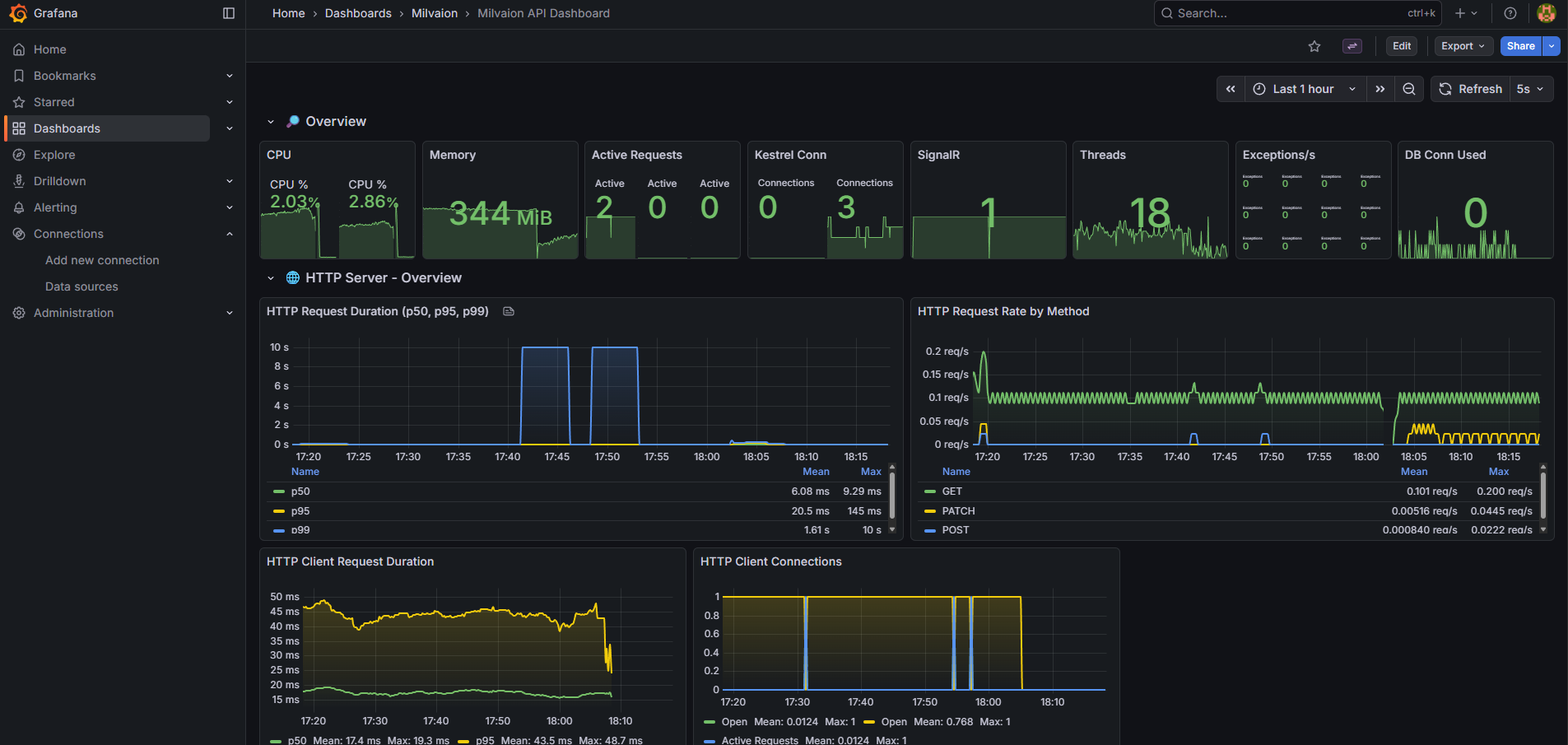
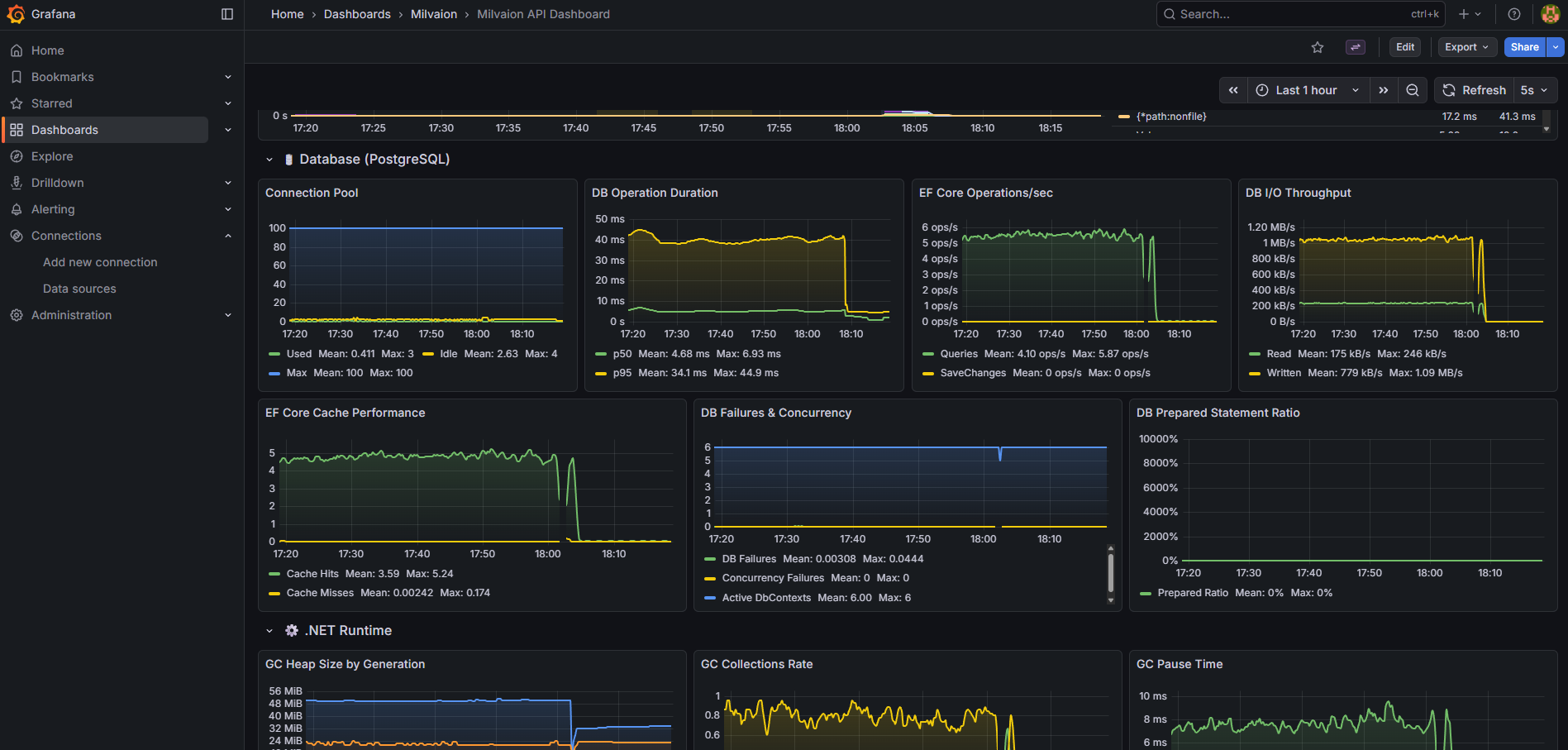
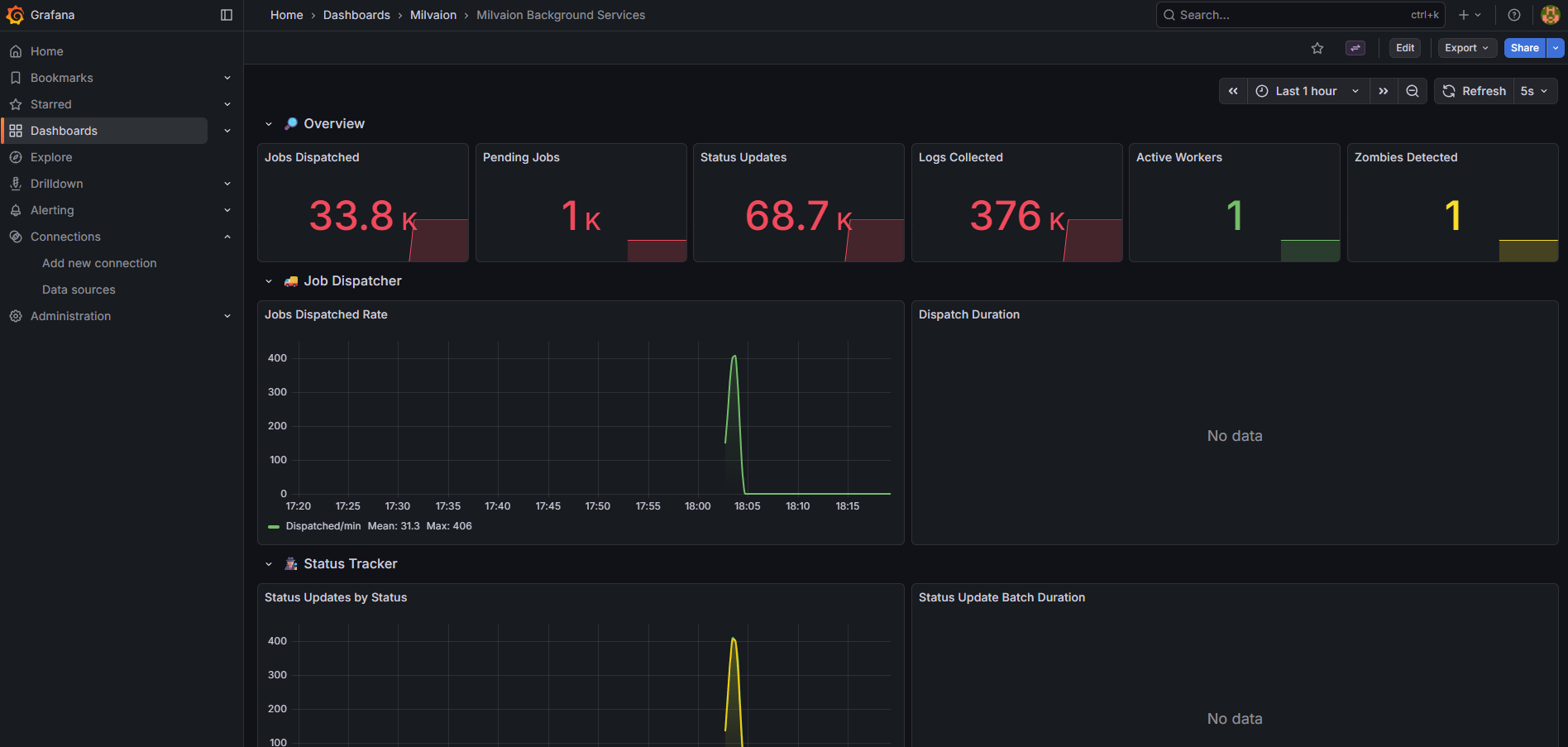
Grafana Dashboards
Milvaion includes two pre-configured Grafana dashboards located in build/grafana/provisioning/dashboards/json/:
1. Milvaion API Dashboard (milvaion-api.json)
General API and infrastructure monitoring:
| Section | Panels |
|---|---|
| Overview | CPU, Memory, Active Requests, Kestrel Connections, SignalR, Thread Pool |
| HTTP Requests | Request Rate, Response Times (p50/p95/p99), Status Codes, Error Rate |
| Database | Query Duration, Active Connections, Commands/sec, Connection Pool |
| Memory | GC Collections, Heap Size, LOH Size, Allocation Rate |
2. Background Services Dashboard (milvaion-background-services.json)
Dedicated monitoring for all background services:
| Section | Panels |
|---|---|
| Overview | Jobs Dispatched, Pending Jobs, Status Updates, Logs Collected, Active Workers, Zombies Detected |
| Job Dispatcher | Dispatch Rate (jobs/min), Dispatch Duration (p50/p95/p99), Failures |
| Status Tracker | Updates by Status, Batch Duration, Failures |
| Log Collector | Collection Rate, Batch Duration, Queue Size |
| Worker Discovery | Registrations/min, Heartbeats/min, Active Workers, Heartbeat Duration |
| Zombie & Failed Handlers | Zombies Detected/Recovered, Failed Occurrences Processed/Retried |
| Service Health | Errors by Service, Iteration Duration by Service |
Useful PromQL Queries
# Jobs dispatched per minute
rate(milvaion_dispatcher_jobs_dispatched_total{job="milvaion-api"}[1m]) * 60

# Dispatch failure rate
rate(milvaion_dispatcher_dispatch_failures_total[5m]) / rate(milvaion_dispatcher_jobs_dispatched_total[5m])

# Status updates by status type
sum by (status) (rate(milvaion_status_tracker_updates_by_status_total[5m]))

# Average dispatch duration (p95)
histogram_quantile(0.95, sum(rate(milvaion_dispatcher_dispatch_duration_bucket[5m])) by (le))

# Active workers count
milvaion_worker_discovery_active_workers

# Zombie detection rate (per 5 minutes)
increase(milvaion_zombie_detector_detected_total[5m])

# Service error rate by service
sum by (service) (rate(milvaion_background_service_errors_total[5m]))
Access Dashboards
- Grafana UI: http://localhost:3000 (default: admin/admin)
- Milvaion API Dashboard: Pre-loaded as "Milvaion API Dashboard"
- Background Services Dashboard: Pre-loaded as "Milvaion Background Services"
RabbitMQ Monitoring
Management UI
Access at http://localhost:15672:
- Overview: Message rates, connections
- Queues: Depth, consumers, message rates
- Exchanges: Routing statistics
Key Metrics
| Metric | Healthy Range | Action if Exceeded |
|---|---|---|
| Queue depth | < 1000 | Scale workers |
| Unacked messages | < 100 | Check worker health |
| Memory usage | < 80% | Add RAM or scale |
| Disk alarm | Not triggered | Add disk space |
CLI Monitoring
# Queue status
docker exec milvaion-rabbitmq rabbitmqctl list_queues name messages consumers

# Connection count
docker exec milvaion-rabbitmq rabbitmqctl list_connections
Queue Depth Monitoring (IQueueDepthMonitor)
Milvaion includes a built-in IQueueDepthMonitor service that tracks queue depths and health status. When the RabbitMQ Management HTTP API is enabled, it provides richer statistics — including unacknowledged message counts — and automatically discovers dynamic consumer queues (e.g. scheduled_jobs_queue.SampleWorker) that are created at runtime when workers bind to the exchange.
Configuration
Enable Management API integration in appsettings.json:
{
  "MilvaionConfig": {
    "RabbitMQ": {
      "ManagementEnabled": true,
      "ManagementPort": 15672
    }
  }
}
| Setting | Default | Description |
|---|---|---|
ManagementEnabled | false | Enable RabbitMQ Management HTTP API integration |
ManagementPort | 15672 | Management plugin HTTP port |
QueueDepthWarningThreshold | 5000 | Message count that triggers a Warning health status |
QueueDepthCriticalThreshold | 10000 | Message count that triggers a Critical health status |
Note: The Management API uses the same
UsernameandPasswordcredentials configured underMilvaionConfig:RabbitMQ.
How it Works
| Scenario | Behavior |
|---|---|
ManagementEnabled: true | Uses GET /api/queues/{vhost}/{queue} for individual queue stats |
ManagementEnabled: true | Uses GET /api/queues/{vhost} to discover all queues, including dynamic routing-key queues |
ManagementEnabled: false or API unavailable | Falls back to AMQP passive queue declare (core queues only, MessagesUnacknowledged will be 0) |
Queue Health Statuses
| Status | Condition |
|---|---|
Healthy | Message count below warning threshold |
Warning | Message count ≥ QueueDepthWarningThreshold |
Critical | Message count ≥ QueueDepthCriticalThreshold |
Unavailable | Queue or broker unreachable |
API Endpoints
Retrieve queue stats via the Admin API:
# All queues (includes dynamic consumer queues when Management API is enabled)
curl http://localhost:5000/api/v1/admin/queues

# Single queue depth
curl http://localhost:5000/api/v1/admin/queues/{queueName}
Example response for a single queue:
{
  "queueName": "scheduled_jobs_queue",
  "messageCount": 42,
  "consumerCount": 3,
  "messagesReady": 40,
  "messagesUnacknowledged": 2,
  "healthStatus": "Healthy",
  "healthMessage": "Queue operating normally",
  "timestamp": "2026-01-14T18:10:00.000Z"
}
Dynamic queues: Without Management API enabled, only the 8 core queues (
jobs,worker_logs,worker_heartbeat,worker_registration,status_updates,failed_occurrences,external_job_registration,external_job_occurrence) are monitored. With it enabled, all queues in the vhost — including per-worker routing-key queues likescheduled_jobs_queue.SampleWorker— are returned automatically.
Redis Monitoring
Key Metrics
| Metric | Command | Healthy Range |
|---|---|---|
| Memory used | INFO memory | < 80% maxmemory |
| Connected clients | INFO clients | < 10000 |
| Commands/sec | INFO stats | Varies |
| Keyspace | INFO keyspace | Growing slowly |
CLI Commands
# Memory info
docker exec milvaion-redis redis-cli INFO memory

# Slow queries
docker exec milvaion-redis redis-cli SLOWLOG GET 10

# Active keys
docker exec milvaion-redis redis-cli DBSIZE
Database Monitoring
PostgreSQL Key Metrics
| Metric | Query | Threshold |
|---|---|---|
| Active connections | SELECT count(*) FROM pg_stat_activity | < max_connections |
| Long-running queries | SELECT * FROM pg_stat_activity WHERE state = 'active' AND query_start < now() - interval '5 minutes' | 0 |
| Table bloat | SELECT pg_size_pretty(pg_total_relation_size('JobOccurrences')) | Monitor growth |
Useful Queries
-- Occurrence count by status (last 24h)
SELECT "Status", COUNT(*)
FROM "JobOccurrences"
WHERE "CreatedAt" > NOW() - INTERVAL '24 hours'
GROUP BY "Status";

-- Slowest jobs (avg duration)
SELECT j."JobType", AVG(o."DurationMs") as avg_ms, COUNT(*) as count
FROM "JobOccurrences" o
JOIN "ScheduledJobs" j ON o."JobId" = j."Id"
WHERE o."Status" = 2 -- Completed
GROUP BY j."JobType"
ORDER BY avg_ms DESC
LIMIT 10;

-- Failed jobs by type (last 7 days)
SELECT j."JobType", COUNT(*) as failures
FROM "JobOccurrences" o
JOIN "ScheduledJobs" j ON o."JobId" = j."Id"
WHERE o."Status" = 3 -- Failed
AND o."CreatedAt" > NOW() - INTERVAL '7 days'
GROUP BY j."JobType"
ORDER BY failures DESC;
Troubleshooting
Jobs Not Executing
- Check dispatcher is running:
docker logs milvaion-api | grep -i dispatch - Check workers are registered:
curl http://localhost:5000/api/v1/workers - Check RabbitMQ queues: http://localhost:15672
- Check Redis scheduled jobs:
docker exec milvaion-redis redis-cli ZRANGE "Milvaion:JobScheduler:scheduled_jobs" 0 -1 WITHSCORES
High Memory Usage
- Check for large job payloads
- Check occurrence log sizes
- Enable database cleanup jobs
- Check for memory leaks in custom jobs
Slow Dashboard
- Check PostgreSQL query performance
- Add indexes if missing
- Increase API connection pool
- Enable response caching
What's Next?
- Database Maintenance - Cleanup and retention policies
- Security – Security considerations
- MilvaionUI – UI screenshoots