Implementing Jobs
This guide covers advanced job implementation patterns including dependency injection, error handling, long-running jobs, and testing.
Job Interfaces
Milvaion provides a comprehensive set of job interfaces organized into a hierarchy:
Base Interface
/// <summary>
/// Base interface for all job types.
/// </summary>
public interface IJobBase
{
}
All job interfaces inherit from IJobBase, enabling common type constraints and discovery.
Non-Generic Interfaces
For jobs that don't require strongly-typed job data:
| Interface | Async | Returns Result | Use Case |
|---|---|---|---|
IJob | No | No | Simple synchronous operations (legacy) |
IJobWithResult | No | Yes | Sync operations that return data |
IAsyncJob | Yes | No | Recommended for most jobs |
IAsyncJobWithResult | Yes | Yes | Async operations that return data |
Synchronous jobs (IJob, IJobWithResult) do not support cancellation. For cancellation support, use the async variants (IAsyncJob, IAsyncJobWithResult).
Generic Interfaces (Typed Job Data)
For jobs that require strongly-typed job data, use the generic variants:
| Interface | Async | Returns Result | Use Case |
|---|---|---|---|
IJob<TJobData> | No | No | Sync operations with typed data |
IJobWithResult<TJobData> | No | Yes | Sync operations with typed data and result |
IAsyncJob<TJobData> | Yes | No | Recommended - Async with typed data |
IAsyncJobWithResult<TJobData> | Yes | Yes | Async with typed data and result |
The generic type parameter TJobData must satisfy where TJobData : class, new() constraint.
Always use async interfaces (IAsyncJob or IAsyncJobWithResult, with or without generic). Synchronous jobs block threads and don't support cancellation.
Job Data Schema Discovery
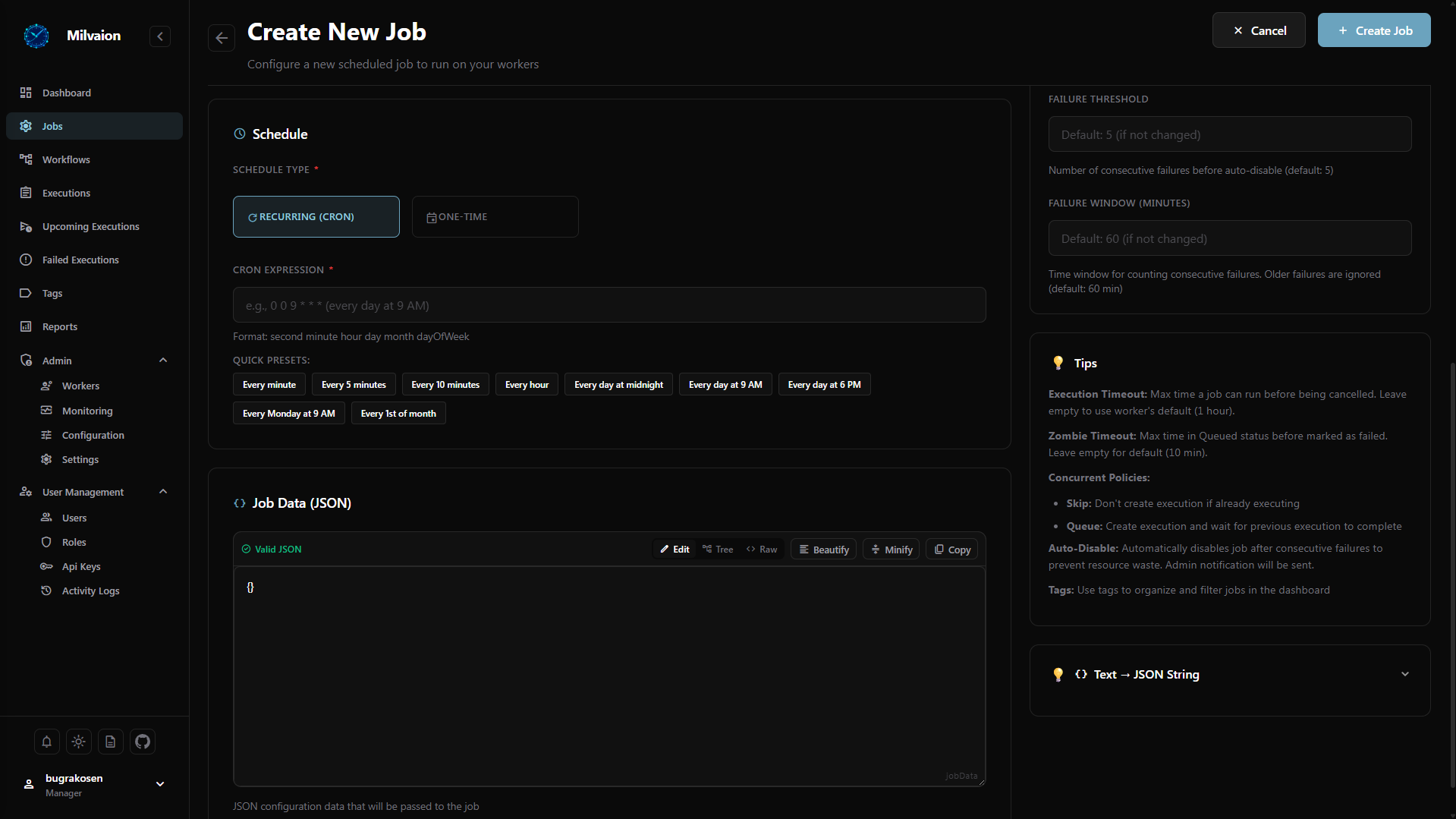
Milvaion automatically discovers your job data classes and sends their schema to the scheduler. This schema is displayed in the dashboard UI, helping users understand what data each job expects.
Use the following attributes to provide metadata:
| Attribute | Purpose |
|---|---|
[Required] | Marks the property as mandatory |
[Description("...")] | Provides a user-friendly description |
[DefaultValue(...)] | Specifies the default value |
using System.ComponentModel;
using System.ComponentModel.DataAnnotations;

/// <summary>
/// Job data definition with schema metadata.
/// This schema is automatically discovered and displayed in the dashboard.
/// </summary>
public class OrderJobData
{
    /// <summary>
    /// The order identifier to process.
    /// </summary>
    [Required]
    [Description("The unique identifier of the order to process")]
    public int OrderId { get; set; }

    /// <summary>
    /// The customer identifier.
    /// </summary>
    [Required]
    [Description("The customer ID associated with this order")]
    public string CustomerId { get; set; } = "";

    /// <summary>
    /// Priority level for processing.
    /// </summary>
    [DefaultValue(1)]
    [Description("Processing priority (1=Low, 2=Normal, 3=High)")]
    public int Priority { get; set; } = 1;
}
The dashboard displays these descriptions to help users fill in job data correctly when creating or triggering jobs manually.
Basic Job Structure
using System.Text.Json;
using Milvasoft.Milvaion.Sdk.Worker.Abstractions;

namespace MyWorker.Jobs;

public class ProcessOrderJob : IAsyncJob
{
    public async Task ExecuteAsync(IJobContext context)
    {
        // 1. Log start
        context.LogInformation("?? Processing order...");

        // 2. Parse job data
        var data = ParseJobData<OrderJobData>(context);

        // 3. Validate
        ValidateData(data, context);

        // 4. Execute business logic
        await ProcessOrderAsync(data, context.CancellationToken);

        // 5. Log completion
        context.LogInformation("? Order processed successfully");
    }

    private T ParseJobData<T>(IJobContext context) where T : new()
    {
        if (string.IsNullOrWhiteSpace(context.Job.JobData))
            return new T();

        return JsonSerializer.Deserialize<T>(context.Job.JobData) ?? new T();
    }

    private void ValidateData(OrderJobData data, IJobContext context)
    {
        if (data.OrderId <= 0)
        {
            context.LogError("Invalid OrderId");
            throw new ArgumentException("OrderId must be positive");
        }
    }

    private async Task ProcessOrderAsync(OrderJobData data, CancellationToken ct)
    {
        // Your business logic here
        await Task.Delay(1000, ct);
    }
}

public class OrderJobData
{
    public int OrderId { get; set; }
    public string CustomerId { get; set; } = "";
}
Using Generic Interfaces (Recommended)
When using generic interfaces, you declare the expected job data type directly in the interface. This provides better type safety and clearer intent:
using Milvasoft.Milvaion.Sdk.Worker.Abstractions;

namespace MyWorker.Jobs;

// The generic type parameter declares the expected job data schema
public class SendEmailJob : IAsyncJob<EmailJobData>
{
    private readonly IEmailService _emailService;

    public SendEmailJob(IEmailService emailService)
    {
        _emailService = emailService;
    }

    public async Task ExecuteAsync(IJobContext context)
    {
        // Use GetData<T> to deserialize typed job data
        var data = context.GetData<EmailJobData>();

        await _emailService.SendAsync(data.To, data.Subject, data.Body);

        context.LogInformation($"Email sent to {data.To}");
    }
}

/// <summary>
/// Email job data definition with schema metadata.
/// </summary>
public class EmailJobData
{
    /// <summary>
    /// Recipient email address.
    /// </summary>
    [Required]
    [Description("The email address to send to")]
    public string To { get; set; } = "";

    /// <summary>
    /// Email subject line.
    /// </summary>
    [Required]
    [Description("The subject of the email")]
    public string Subject { get; set; } = "";

    /// <summary>
    /// Email body content.
    /// </summary>
    [Description("The body content of the email")]
    public string Body { get; set; } = "";

    /// <summary>
    /// Whether the body is HTML.
    /// </summary>
    [DefaultValue(false)]
    [Description("Set to true if the body contains HTML")]
    public bool IsHtml { get; set; }
}
Generic Interface with Result
public class GenerateReportJob : IAsyncJobWithResult<ReportJobData>
{
    public async Task<string> ExecuteAsync(IJobContext context)
    {
        var data = context.GetData<ReportJobData>();

        var report = await GenerateReportAsync(data);

        return JsonSerializer.Serialize(new { ReportId = report.Id, RowCount = report.Count });
    }
}

/// <summary>
/// Report job data definition with schema metadata.
/// </summary>
public class ReportJobData
{
    /// <summary>
    /// Type of report to generate.
    /// </summary>
    [Required]
    [Description("The type of report (e.g., 'sales', 'inventory', 'financial')")]
    public string ReportType { get; set; } = "";

    /// <summary>
    /// Report start date.
    /// </summary>
    [Required]
    [Description("The start date for the report period")]
    public DateTime StartDate { get; set; }

    /// <summary>
    /// Report end date.
    /// </summary>
    [Required]
    [Description("The end date for the report period")]
    public DateTime EndDate { get; set; }

    /// <summary>
    /// Output format.
    /// </summary>
    [DefaultValue("pdf")]
    [Description("Output format: 'pdf', 'xlsx', or 'csv'")]
    public string Format { get; set; } = "pdf";
}
Dependency Injection
Injecting Services
Jobs fully support constructor injection:
public class SendEmailJob : IAsyncJob
{
    private readonly IEmailService _emailService;
    private readonly IUserRepository _userRepository;
    private readonly ILogger<SendEmailJob> _logger;

    public SendEmailJob(
        IEmailService emailService,
        IUserRepository userRepository,
        ILogger<SendEmailJob> logger)
    {
        _emailService = emailService;
        _userRepository = userRepository;
        _logger = logger;
    }

    public async Task ExecuteAsync(IJobContext context)
    {
        var data = JsonSerializer.Deserialize<EmailJobData>(context.Job.JobData ?? "{}");

        // Use injected services
        var user = await _userRepository.GetByIdAsync(data.UserId);

        await _emailService.SendAsync(
            to: user.Email,
            subject: data.Subject,
            body: data.Body
        );

        // Both logger and context.LogInformation work
        _logger.LogInformation("Email sent to {Email}", user.Email);
        context.LogInformation($"Email sent to {user.Email}");
    }
}
Registering Services
In Program.cs:
var builder = Host.CreateApplicationBuilder(args);

// Register your services
builder.Services.AddScoped<IEmailService, SmtpEmailService>();
builder.Services.AddScoped<IUserRepository, UserRepository>();

// Register HttpClient with retry policies
builder.Services.AddHttpClient<IExternalApiClient, ExternalApiClient>()
    .AddTransientHttpErrorPolicy(p =>
        p.WaitAndRetryAsync(3, retry => TimeSpan.FromSeconds(Math.Pow(2, retry))));

// Register database context
builder.Services.AddDbContext<AppDbContext>(options =>
    options.UseNpgsql(builder.Configuration.GetConnectionString("Default")));

// Register Worker SDK (must be last)
builder.Services.AddMilvaionWorkerWithJobs(builder.Configuration);

var host = builder.Build();
await host.RunAsync();
Scoped vs Singleton Services
Jobs are created per-execution (scoped), so:
- ✅ Scoped services: Fully supported (DbContext, repositories)
- ✅ Transient services: Fully supported
- ⚠️ Singleton services: Supported, but must be thread-safe
// ✅ Correct - scoped lifetime per job execution
builder.Services.AddScoped<IOrderProcessor, OrderProcessor>();

// ⚠️ Be careful - shared across all job executions
builder.Services.AddSingleton<ICache, MemoryCache>();
Handling Cancellation
Why Cancellation Matters
Workers receive cancellation requests when:
- User cancels a job from the dashboard
- Worker is shutting down (SIGTERM)
- Execution timeout is exceeded
There are 3 types execution timeouts.
- Per job (you can set when creating jobs via api)
- Per job type in worker (you can set when creating worker via configuration)
- Per worker. This effects all worker's jobs if none of above was not provided (you can set when creating worker via configuration)
The order of validity is as above.
Checking Cancellation
public async Task ExecuteAsync(IJobContext context)
{
    var items = await FetchItemsAsync();

    foreach (var item in items)
    {
        // Option 1: Throw if cancelled
        context.CancellationToken.ThrowIfCancellationRequested();

        // Option 2: Check and exit gracefully
        if (context.CancellationToken.IsCancellationRequested)
        {
            context.LogWarning("Cancellation requested, stopping gracefully");
            return;
        }

        await ProcessItemAsync(item, context.CancellationToken);
    }
}
Passing CancellationToken
Always pass the token to async operations:
public async Task ExecuteAsync(IJobContext context)
{
    var ct = context.CancellationToken;

    // Pass to HTTP calls
    var response = await _httpClient.GetAsync(url, ct);

    // Pass to database queries
    var users = await _dbContext.Users.ToListAsync(ct);

    // Pass to delays
    await Task.Delay(1000, ct);

    // Pass to your services
    await _myService.ProcessAsync(data, ct);
}
Error Handling
Transient vs Permanent Errors
| Error Type | Should Retry | Examples |
|---|---|---|
| Transient | Yes | Network timeout, rate limit, DB connection |
| Permanent | No | Invalid data, auth failure, business rules |
Custom Exception Types
You can distinguish between permanent and transient exceptions to decide whether a job should be retried.
Throw a sdk defined PermanentJobException to disable retry behavior for the job.
public class PermanentJobException : Exception
{
    public PermanentJobException(string message, Exception inner = null)  : base(message, inner) { }
}
// In your job
public async Task ExecuteAsync(IJobContext context)
{
    try
    {
        await _externalApi.CallAsync();
    }
    catch (HttpRequestException ex) when (ex.StatusCode == HttpStatusCode.ServiceUnavailable)
    {
        // re-throw for retry
        throw;
    }
    catch (HttpRequestException ex) when (ex.StatusCode == HttpStatusCode.BadRequest)
    {
        // Permanent error - execution will not retry
        throw new PermanentJobException("Service unavailable!", ex);
    }
}
Returning Results
Use IAsyncJobWithResult to return data:
public class GenerateReportJob : IAsyncJobWithResult
{
    private readonly IReportService _reportService;

    public GenerateReportJob(IReportService reportService)
    {
        _reportService = reportService;
    }

    public async Task<string> ExecuteAsync(IJobContext context)
    {
        var data = JsonSerializer.Deserialize<ReportJobData>(context.Job.JobData ?? "{}");

        context.LogInformation($"Generating {data.ReportType} report...");

        var report = await _reportService.GenerateAsync(
            data.ReportType,
            data.StartDate,
            data.EndDate,
            context.CancellationToken
        );

        context.LogInformation($"Report generated: {report.FileName}");

        // Return JSON - stored in occurrence.Result
        return JsonSerializer.Serialize(new
        {
            ReportId = report.Id,
            FileName = report.FileName,
            RowCount = report.RowCount,
            FileSize = report.FileSize
        });
    }
}
The result is stored in the occurrence and visible in the dashboard.
Long-Running Jobs
Configuration
For jobs that run for hours, configure appropriate timeouts:
{
  "JobConsumers": {
    "DataMigrationJob": {
      "ExecutionTimeoutSeconds": 14400,
      "MaxRetries": 1,
      "BaseRetryDelaySeconds": 60
    }
  }
}
Note: 14400 seconds = 4 hours
Progress Logging
Keep users informed with periodic logs:
public async Task ExecuteAsync(IJobContext context)
{
    var items = await LoadItemsAsync();
    var total = items.Count;
    var processed = 0;

    context.LogInformation($"Starting migration of {total} items");

    foreach (var item in items)
    {
        context.CancellationToken.ThrowIfCancellationRequested();

        await ProcessItemAsync(item);
        processed++;

        // Log progress every 100 items or 10%
        if (processed % 100 == 0 || processed % (total / 10) == 0)
        {
            var percent = (processed * 100) / total;
            context.LogInformation($"Progress: {processed}/{total} ({percent}%)");
        }
    }

    context.LogInformation("Migration complete: {Count} items processed", processed);
}
Heartbeat Considerations
Long-running jobs need RabbitMQ heartbeats. The SDK handles this automatically with:
ConsumerDispatchConcurrencyset appropriately- Async job execution (doesn't block heartbeat thread)
Logging Best Practices
Log Levels
public async Task ExecuteAsync(IJobContext context)
{
    // Information - Normal flow, key milestones
    context.LogInformation("Starting email send...");

    // Warning - Unexpected but handled situations
    context.LogWarning("Rate limited, backing off...");

    // Error - Failures (usually with exception)
    context.LogError("Failed to send email", exception);

    // Debug - Detailed info for troubleshooting (not shown by default)
    context.LogDebug($"Email payload: {jsonPayload}");
}
Structured Data
Pass additional data for filtering/analysis:
context.LogInformation("Order processed", new Dictionary<string, object>
{
    ["OrderId"] = data.OrderId,
    ["CustomerId"] = data.CustomerId,
    ["TotalAmount"] = data.TotalAmount,
    ["ItemCount"] = data.Items.Count
});
Avoid Sensitive Data
// ❌ Do not log sensitive data
context.LogInformation($"Processing payment with card {cardNumber}");

// ✅ Mask or omit sensitive data
context.LogInformation($"Processing payment for order {orderId}");
context.LogInformation($"Card ending in {cardNumber[^4..]}");
Testing Jobs
Unit Testing
public class SendEmailJobTests
{
    [Fact]
    public async Task ExecuteAsync_SendsEmail_WhenDataIsValid()
    {
        // Arrange
        var emailService = new Mock<IEmailService>();
        var job = new SendEmailJob(emailService.Object);

        var context = new MockJobContext
        {
            Job = new ScheduledJob
            {
                JobData = JsonSerializer.Serialize(new EmailJobData
                {
                    To = "[email protected]",
                    Subject = "Test",
                    Body = "Hello"
                })
            }
        };

        // Act
        await job.ExecuteAsync(context);

        // Assert
        emailService.Verify(x => x.SendAsync(
            "[email protected]",
            "Test",
            "Hello",
            It.IsAny<CancellationToken>()
        ), Times.Once);
    }

    [Fact]
    public async Task ExecuteAsync_ThrowsArgumentException_WhenToIsEmpty()
    {
        // Arrange
        var emailService = new Mock<IEmailService>();
        var job = new SendEmailJob(emailService.Object);

        var context = new MockJobContext
        {
            Job = new ScheduledJob { JobData = "{}" }
        };

        // Act & Assert
        await Assert.ThrowsAsync<ArgumentException>(
            () => job.ExecuteAsync(context)
        );
    }
}
MockJobContext
Create a test helper:
public class MockJobContext : IJobContext
{
    public Guid CorrelationId { get; set; } = Guid.NewGuid();
    public ScheduledJob Job { get; set; } = new();
    public string WorkerId { get; set; } = "sample-worker";
    public CancellationToken CancellationToken { get; set; } = CancellationToken.None;

    public List<string> Logs { get; } = new();

    public void LogInformation(string message, Dictionary<string, object> data = null)
        => Logs.Add($"[INFO] {message}");

    public void LogWarning(string message, Dictionary<string, object> data = null)
        => Logs.Add($"[WARN] {message}");

    public void LogError(string message, Exception ex = null, Dictionary<string, object> data = null)
        => Logs.Add($"[ERROR] {message}");
}
What's Next?
- Configuration - All configuration options
- Deployment - Production deployment
- Reliability - Retry, DLQ, and error handling