Enterprise Features
Milvaion includes a comprehensive set of enterprise features for managing access control, tracking user activities, auditing changes, and generating automated performance reports. This document covers the built-in identity and compliance infrastructure alongside the metric reporting system.
User Management
Milvaion provides a full user management system with role-based access control. Users are managed through the UsersController API and the Dashboard UI.
User Types
| Type | Value | Description |
|---|---|---|
Manager | 1 | Access to management screens (Dashboard, Jobs, Workers, Settings) |
AppUser | 2 | Access to user profile and view-only screens |
User Properties
| Property | Type | Description |
|---|---|---|
UserName | string | Unique login identifier |
Email | string | User email address |
Name | string | First name |
Surname | string | Last name |
UserType | enum | Manager or AppUser |
RoleIdList | int[] | Roles assigned to the user |
AllowedNotifications | AlertType[] | Which alert types the user receives as internal notifications |
API Endpoints
All user endpoints require Manager user type and the corresponding UserManagement.* permission.
| Method | Endpoint | Permission | Description |
|---|---|---|---|
PATCH | /api/v1.0/users | UserManagement.List | Paginated user list with filtering and sorting |
GET | /api/v1.0/users/user?UserId={id} | UserManagement.Detail | Get user detail with roles and audit info |
POST | /api/v1.0/users/user | UserManagement.Create | Create a new user |
PUT | /api/v1.0/users/user | UserManagement.Update | Partial update (only fields marked as updated) |
DELETE | /api/v1.0/users/user?UserId={id} | UserManagement.Delete | Delete a user |
Create User Example
curl -X POST https://your-domain/api/v1.0/users/user \
  -H "Authorization: Bearer <token>" \
  -H "Content-Type: application/json" \
  -d '{
    "userName": "johndoe",
    "email": "[email protected]",
    "name": "John",
    "surname": "Doe",
    "password": "SecurePass123!",
    "userType": 1,
    "roleIdList": [1, 2],
    "allowedNotifications": [3, 4, 6]
  }'
User Detail Response
{
  "isSuccess": true,
  "data": {
    "id": 5,
    "userName": "johndoe",
    "email": "[email protected]",
    "name": "John",
    "surname": "Doe",
    "roles": [
      { "id": 1, "name": "Admin" },
      { "id": 2, "name": "Editor" }
    ],
    "allowedNotifications": [3, 4, 6],
    "auditInfo": {
      "creationDate": "2026-06-01T10:00:00Z",
      "creatorUserName": "rootuser",
      "lastModificationDate": "2026-06-10T14:30:00Z",
      "lastModifierUserName": "rootuser"
    }
  }
}
Role Management
Roles group permissions together and are assigned to users. Each role can have multiple permissions and multiple users.
Role Properties
| Property | Type | Description |
|---|---|---|
Name | string | Role display name (e.g., Admin, Viewer, Editor) |
Permissions | list | Permissions assigned to this role |
Users | list | Users belonging to this role |
API Endpoints
All role endpoints require Manager user type and the corresponding RoleManagement.* permission.
| Method | Endpoint | Permission | Description |
|---|---|---|---|
PATCH | /api/v1.0/roles | RoleManagement.List | Paginated role list |
GET | /api/v1.0/roles/role?RoleId={id} | RoleManagement.Detail | Get role detail with users and permissions |
POST | /api/v1.0/roles/role | RoleManagement.Create | Create a new role with permissions |
PUT | /api/v1.0/roles/role | RoleManagement.Update | Partial update |
DELETE | /api/v1.0/roles/role?RoleId={id} | RoleManagement.Delete | Delete a role |
Role Detail Response
{
  "isSuccess": true,
  "data": {
    "id": 2,
    "name": "Editor",
    "permissions": [
      { "id": 3, "name": "List" },
      { "id": 4, "name": "Detail" },
      { "id": 5, "name": "Create" },
      { "id": 6, "name": "Update" }
    ],
    "users": [
      { "id": 5, "name": "johndoe" },
      { "id": 8, "name": "janesmith" }
    ],
    "auditInfo": {
      "creationDate": "2026-01-15T08:00:00Z",
      "creatorUserName": "rootuser"
    }
  }
}
Permission Management
Milvaion uses a code-first permission system. Permissions are defined in PermissionCatalog as static constants organized into groups. They are migrated to the database via the /permissions/migrate endpoint and assigned to roles.
Permission Groups
| Group | Permissions | Description |
|---|---|---|
App | SuperAdmin | Full system access |
UserManagement | List, Detail, Create, Update, Delete | User CRUD operations |
RoleManagement | List, Detail, Create, Update, Delete | Role CRUD operations |
PermissionManagement | List | View system permissions |
ActivityLogManagement | List | View activity logs |
ScheduledJobManagement | List, Detail, Create, Update, Delete, Cancel, Trigger | Job scheduling operations |
WorkerManagement | List, Detail, Delete | Worker instance management |
FailedOccurrenceManagement | List, Detail, Create, Update, Delete | Failed job (DLQ) management |
WorkflowManagement | List, Detail, Create, Update, Delete, Trigger | Workflow operations |
SystemAdministration | List, Detail, Update, Delete | System-level settings |
ContentManagement | List, Detail, Create, Update, Delete | CMS content operations |
NamespaceManagement | List, Detail, Create, Update, Delete | Content namespace operations |
ResourceGroupManagement | List, Detail, Create, Update, Delete | Content resource group operations |
LanguageManagement | List, Update | Language/localization management |
InternalNotificationManagement | List, Detail, Create, Update, Delete | In-app notification management |
API Endpoints
| Method | Endpoint | Permission | Description |
|---|---|---|---|
PATCH | /api/v1.0/permissions | PermissionManagement.List | List all permissions with group info |
PUT | /api/v1.0/permissions/migrate | App.SuperAdmin | Sync code-defined permissions to database |
How It Works
PermissionCatalog (C# code)
│
├─ UserManagement
│  ├─ List    = "UserManagement.List"
│  ├─ Detail  = "UserManagement.Detail"
│  ├─ Create  = "UserManagement.Create"
│  ├─ Update  = "UserManagement.Update"
│  └─ Delete  = "UserManagement.Delete"
│
├─ RoleManagement
│  ├─ ...
│
└─ (other groups)

          │ PUT /permissions/migrate
          ▼
    ┌──────────────┐
    │  Permissions  │  (database table)
    │    table      │
    └──────┬───────┘
           │ assigned to
    ┌──────▼───────┐
    │    Roles     │  (via RolePermissionRelations)
    └──────┬───────┘
           │ assigned to
    ┌──────▼───────┐
    │    Users     │  (via UserRoleRelations)
    └──────────────┘
Authorization Flow
- User logs in → receives JWT token with
UserTypeclaim - On each request, the
[Auth("Permission.Name")]attribute checks if the user's roles include the required permission [UserTypeAuth(UserType.Manager)]restricts entire controllers to specific user typesSuperAdminpermission bypasses all permission checks
Activity Tracking
Milvaion automatically tracks user activities for compliance and auditing purposes. When a user performs a create, update, or delete operation, an ActivityLog record is created in the database.
Activity Log Schema
| Column | Type | Description |
|---|---|---|
Id | int | Auto-increment primary key |
UserName | varchar(100) | Username of the user who performed the action |
Activity | enum (byte) | Activity type from UserActivity enum |
ActivityDate | datetimeoffset | Timestamp of the activity (UTC) |
API Endpoint
| Method | Endpoint | Permission | Description |
|---|---|---|---|
PATCH | /api/v1.0/activitylogs | ActivityLogManagement.List | Paginated list with filtering by user, activity type, and date |
Activity Log Response
{
  "isSuccess": true,
  "totalDataCount": 156,
  "data": [
    {
      "id": 42,
      "userName": "johndoe",
      "activity": 0,
      "activityDescription": "CreateUser",
      "activityDate": "2026-06-15T14:30:00Z"
    },
    {
      "id": 41,
      "userName": "rootuser",
      "activity": 16,
      "activityDescription": "CreateScheduledJob",
      "activityDate": "2026-06-15T12:00:00Z"
    }
  ]
}
Data Retention
Activity logs are automatically cleaned up by the ActivityLogCleanerJob in the Maintenance Worker:
- Schedule: Every 30 days at 02:00 AM UTC
- Default retention: 60 days
Auditing
Beyond activity tracking, Milvaion provides entity-level audit fields on all core entities. These are populated automatically by the Milvasoft framework's auditing infrastructure.
Audit Fields
All auditable entities include:
| Field | Type | Description |
|---|---|---|
CreationDate | datetime | When the record was created |
CreatorUserName | string | Who created the record |
LastModificationDate | datetime | When the record was last modified |
LastModifierUserName | string | Who last modified the record |
These fields are automatically populated by Milvasoft's CreationAuditableEntity and FullAuditableEntity base classes when SaveChanges is called.
Audited Entities
| Entity | Audit Level | Description |
|---|---|---|
User | Full | Created, modified, and soft-deletable with audit trail |
Role | Full | Created with permission assignments tracked |
ScheduledJob | Full | Job configuration changes tracked |
JobOccurrence | Creation | Execution records with creation timestamp |
FailedOccurrence | Creation | Failed job entries with creation audit |
MetricReport | Creation | Generated reports with creator info |
Workflow | Full | Workflow definitions with change tracking |
WorkflowRun | Creation | Workflow execution records |
Content | Full | CMS content with full audit trail |
InternalNotification | Full | Notifications with audit info |
Viewing Audit Information
Audit information is included in detail endpoints. For example, user detail response includes:
{
  "auditInfo": {
    "creationDate": "2026-06-01T10:00:00Z",
    "creatorUserName": "rootuser",
    "lastModificationDate": "2026-06-10T14:30:00Z",
    "lastModifierUserName": "admin"
  }
}
Account Management
Users can manage their own accounts through the AccountController. These endpoints don't require admin permissions — authenticated users can access their own data.
API Endpoints
| Method | Endpoint | Auth | Description |
|---|---|---|---|
POST | /api/v1.0/account/login | Anonymous | Login with username/password, returns JWT |
POST | /api/v1.0/account/login/refresh | Anonymous | Refresh an expired access token |
POST | /api/v1.0/account/logout | Authenticated | Invalidate current session |
PUT | /api/v1.0/account/password/change | Authenticated | Change own password |
GET | /api/v1.0/account/detail | Authenticated | Get own account information |
PATCH | /api/v1.0/account/notifications | Authenticated | List own notifications |
PUT | /api/v1.0/account/notifications/seen | Authenticated | Mark notifications as seen |
DELETE | /api/v1.0/account/notifications | Authenticated | Delete notifications |
Login Response
{
  "isSuccess": true,
  "data": {
    "token": {
      "accessToken": "eyJhbGciOiJIUzI1NiIs...",
      "tokenType": "Bearer",
      "expiresIn": 3600
    }
  }
}
Metric Reports
Milvaion includes an automated reporting system that generates metric reports about your job scheduling infrastructure. Reports are produced periodically by the ReporterWorker and stored in the database. You can view, filter, and manage them through the API and the Dashboard UI.
Overview
| Feature | Description |
|---|---|
| Automated Generation | ReporterWorker produces reports on a configurable schedule |
| 10 Metric Types | Job performance, worker throughput, workflow health, and more |
| Dashboard UI | Visual report cards with charts and drill-down detail pages |
| Data Retention | Built-in cleanup endpoint for removing old reports |
Architecture
┌──────────────┐         ┌────────────┐         ┌───────────────┐
│  PostgreSQL   │──────▶│  Reporter  │──────▶  │  PostgreSQL   │
│ (Occurrences) │ read   │   Worker   │ write   │(MetricReports)│
└──────────────┘         └────────────┘         └──────┬────────┘
                                                       │
                                              ┌────────▼────────┐
                                              │   Milvaion API  │
                                              │ MetricReports   │
                                              │   Controller    │
                                              └────────┬────────┘
                                                       │
                                              ┌────────▼────────┐
                                              │   Dashboard UI  │
                                              │  Report Pages   │
                                              └─────────────────┘
- ReporterWorker queries
JobOccurrences,ScheduledJobs, andWorkflowRuns - Computes aggregated metrics and writes a
MetricReportrecord with a JSONDatapayload - Milvaion API exposes CRUD endpoints through
MetricReportsController - Dashboard UI fetches the latest report per type and renders interactive charts
Metric Types
Milvaion provides 10 built-in metric report types, grouped into three categories:
Job Metrics
| Metric Type | Display Name | Description |
|---|---|---|
FailureRateTrend | Failure Rate Trend | Hourly failure rate percentage over the lookback period |
PercentileDurations | P50 / P95 / P99 Durations | Percentile-based execution duration distribution per job |
TopSlowJobs | Top Slow Jobs | Jobs with the highest average execution duration |
JobHealthScore | Job Health Score | Success rate and occurrence counts for each job |
CronScheduleVsActual | Cron Schedule vs Actual | Deviation between scheduled and actual execution times |
Worker Metrics
| Metric Type | Display Name | Description |
|---|---|---|
WorkerThroughput | Worker Throughput | Job count, success/failure breakdown, and average duration per worker |
WorkerUtilizationTrend | Worker Utilization Trend | Capacity vs actual utilization rate over time |
Workflow Metrics
| Metric Type | Display Name | Description |
|---|---|---|
WorkflowSuccessRate | Workflow Success Rate | Success, failure, partial, and cancelled rates per workflow |
WorkflowStepBottleneck | Workflow Step Bottleneck | Step-level performance analysis (avg/max duration, failure count) |
WorkflowDurationTrend | Workflow Duration Trend | Average workflow execution duration over time |
Report API Reference
All endpoints are served under api/v1.0/metricreports and require Manager user type authentication with the corresponding permissions.
| Method | Endpoint | Permission | Description |
|---|---|---|---|
PATCH | /api/v1.0/metricreports | ScheduledJobManagement.List | Paginated list with optional MetricType filter |
GET | /api/v1.0/metricreports?Id={id} | ScheduledJobManagement.Detail | Get report detail by ID |
GET | /api/v1.0/metricreports/latest?MetricType={type} | ScheduledJobManagement.Detail | Get latest report for a metric type |
DELETE | /api/v1.0/metricreports?Id={id} | ScheduledJobManagement.Delete | Delete a single report |
DELETE | /api/v1.0/metricreports/cleanup?OlderThanDays={days} | ScheduledJobManagement.Delete | Bulk-delete old reports (1–365 days) |
Report Data Schemas
Each metric type stores its data as a JSON payload in the Data field. Below are the schemas for each type.
FailureRateTrend
{
  "thresholdPercentage": 5.0,
  "dataPoints": [
    { "timestamp": "2026-06-01T10:00:00Z", "value": 2.5 },
    { "timestamp": "2026-06-01T11:00:00Z", "value": 3.1 }
  ]
}
PercentileDurations
{
  "jobs": {
    "EmailSenderJob": { "p50": 120.5, "p95": 450.2, "p99": 890.7 },
    "DataSyncJob": { "p50": 80.3, "p95": 310.1, "p99": 620.4 }
  }
}
TopSlowJobs
{
  "jobs": [
    { "jobName": "HeavyReportJob", "averageDurationMs": 45200.5, "occurrenceCount": 12 },
    { "jobName": "DataMigrationJob", "averageDurationMs": 32100.3, "occurrenceCount": 8 }
  ]
}
WorkerThroughput
{
  "workers": [
    {
      "workerId": "worker-1",
      "jobCount": 150,
      "successCount": 145,
      "failureCount": 5,
      "averageDurationMs": 1200.5
    }
  ]
}
WorkerUtilizationTrend
{
  "dataPoints": [
    {
      "timestamp": "2026-06-01T10:00:00Z",
      "workerUtilization": { "worker-1": 75.5, "worker-2": 42.3 }
    }
  ]
}
CronScheduleVsActual
{
  "jobs": [
    {
      "occurrenceId": "01968a3b-...",
      "jobId": "01968a2a-...",
      "jobName": "HourlySync",
      "scheduledTime": "2026-06-01T10:00:00Z",
      "actualTime": "2026-06-01T10:00:12Z",
      "deviationSeconds": 12.0
    }
  ]
}
JobHealthScore
{
  "jobs": [
    {
      "jobName": "EmailSenderJob",
      "successRate": 98.5,
      "totalOccurrences": 200,
      "successCount": 197,
      "failureCount": 3
    }
  ]
}
WorkflowSuccessRate
{
  "workflows": [
    {
      "workflowId": "01968a3b-...",
      "workflowName": "OrderProcessing",
      "successRate": 95.0,
      "totalRuns": 100,
      "completedCount": 95,
      "failedCount": 3,
      "partialCount": 1,
      "cancelledCount": 1,
      "avgDurationMs": 5400.0
    }
  ]
}
WorkflowStepBottleneck
{
  "workflows": [
    {
      "workflowId": "01968a3b-...",
      "workflowName": "OrderProcessing",
      "steps": [
        {
          "stepName": "ValidateOrder",
          "avgDurationMs": 200.5,
          "maxDurationMs": 1500.0,
          "executionCount": 100,
          "failureCount": 2,
          "skippedCount": 0,
          "retryCount": 1
        }
      ]
    }
  ]
}
WorkflowDurationTrend
{
  "dataPoints": [
    {
      "timestamp": "2026-06-01T10:00:00Z",
      "workflowAvgDurationMs": {
        "OrderProcessing": 5200.0,
        "DataPipeline": 12400.0
      }
    }
  ]
}
Dashboard UI
The Milvaion Dashboard includes a dedicated Reports section with two main views.
Report Dashboard
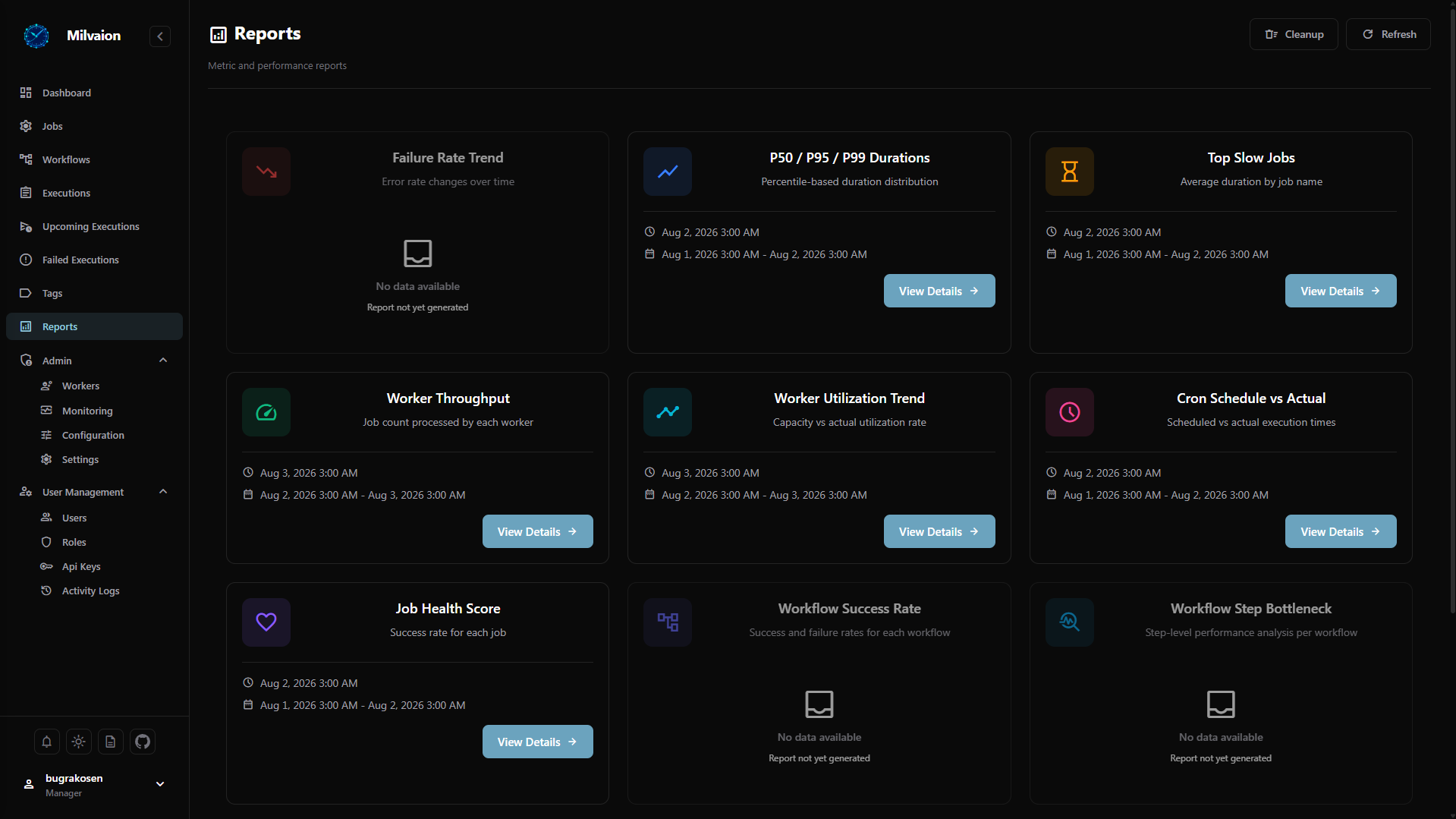
The report dashboard displays a card for each metric type showing:
- Metric name and icon with color-coded category
- Latest report timestamp (or "No data" if no report exists)
- Quick navigation — click a card to view the detailed report with charts
Report Detail Pages
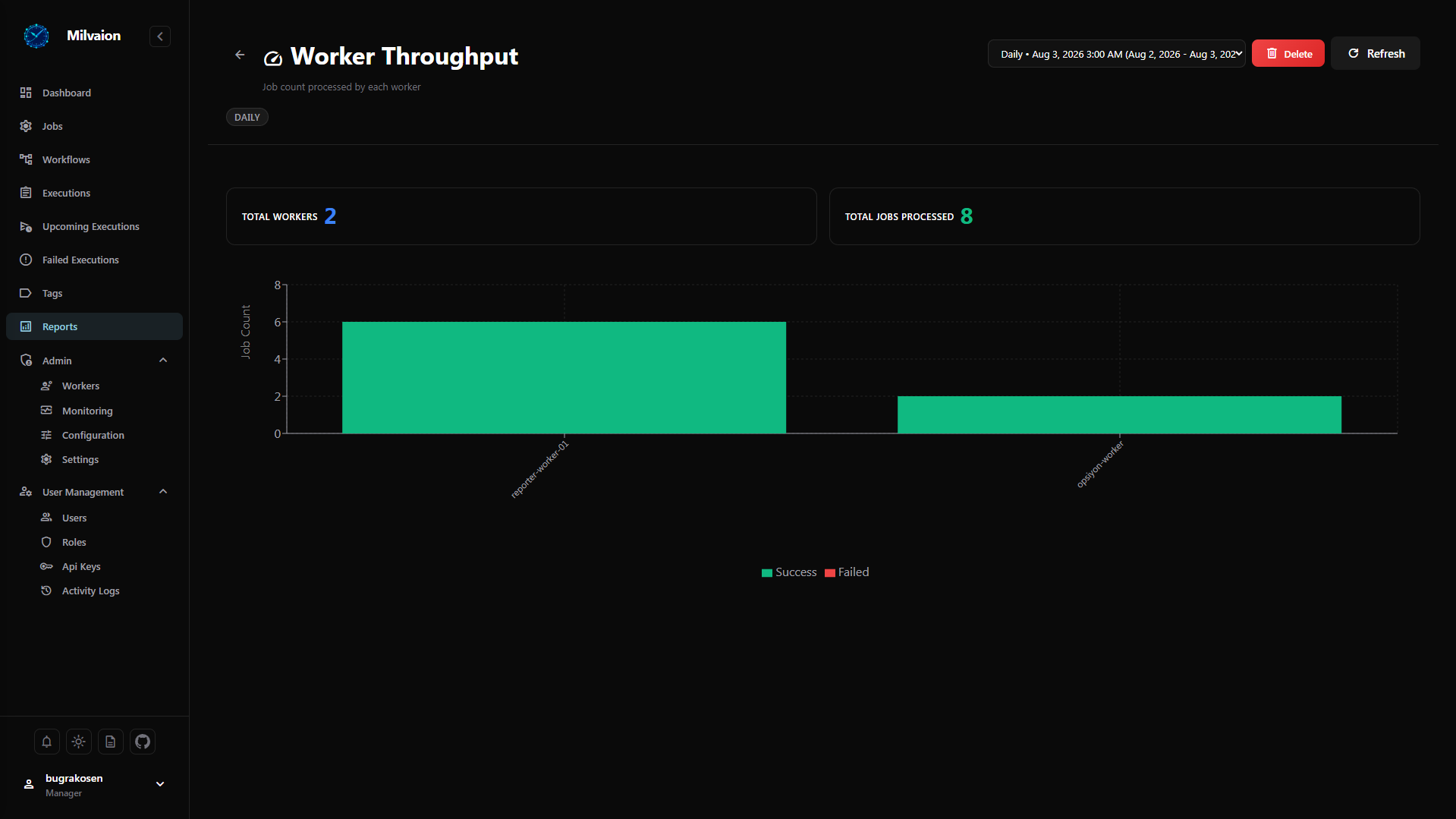
Each metric type has a dedicated detail page with:
- Interactive charts — line charts for time-series data, bar charts for rankings, grouped bars for comparisons
- Data tables — tabular representation of report data with sorting
- Report metadata — generation time, period start/end, tags
- History navigation — browse previous reports of the same type
Cleanup Dialog
The dashboard includes a cleanup dialog accessible from the toolbar:
- Set the retention days threshold (default: 30)
- Click Delete to bulk-remove old reports
- Confirmation shows the number of deleted reports
Report Data Retention
Metric reports accumulate over time. Implement a retention strategy to manage storage:
Recommended retention periods:
| Environment | Retention | Rationale |
|---|---|---|
| Development | 7 days | Minimal storage |
| Staging | 14 days | Enough for testing cycles |
| Production | 30–90 days | Balance between history and storage |
For ReporterWorker configuration and report generation details, see Reporter Worker.