Core Concepts
This page explains the fundamental concepts you need to understand before building with Milvaion.
Architecture Overview
Milvaion consists of four main components:
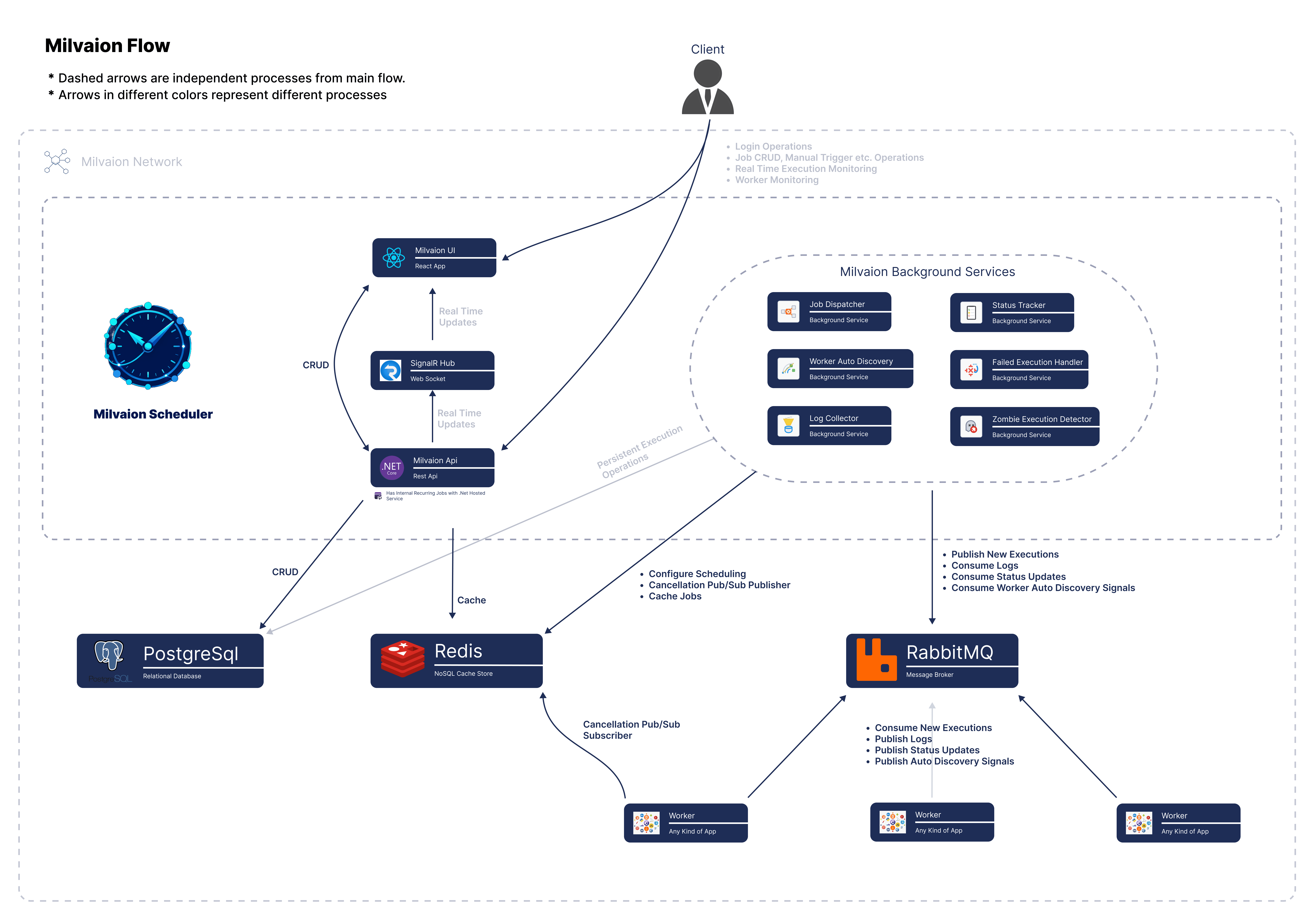
Component Responsibilities
Milvaion API (Scheduler)
The API is responsible for:
| Responsibility | How It Works |
|---|---|
| Job Management | REST endpoints for CRUD operations |
| Scheduling | Stores jobs in Redis ZSET, sorted by next execution time |
| Dispatching | Polls Redis, publishes due jobs to RabbitMQ |
| Status Tracking | Consumes status updates from workers via RabbitMQ |
| Log Collection | Receives and persists execution logs |
| Failed Execution Handling | Consumes failed job DLQ and add them to the database. |
| Zombie Execution Detecting | Monitor not heartbeating unkown occurrences and marks them as zombie. |
| Auto Disabling | Auto disables the always failing jobs according to configurable threshold. |
| Dashboard | Serves React UI + SignalR for real-time updates |
Workers
Workers are separate .NET processes that:
| Responsibility | How It Works |
|---|---|
| Job Execution | Consume messages from RabbitMQ, run IJob code |
| Status Reporting | Publish Running -> Completed/Failed transitions |
| Log Streaming | Send execution logs via RabbitMQ |
| Heartbeating | Periodic Redis updates to prove liveness |
| Retry Handling | Automatic retry with exponential backoff |
Infrastructure
| Component | Purpose |
|---|---|
| PostgreSQL | Persistent storage for jobs, occurrences, logs, users etc. |
| Redis | Fast scheduling (ZSET), distributed locks, caching, heartbeats |
| RabbitMQ | Reliable job distribution, status/log queues, DLQ |
Key Terms
Job
A job is a recurring or one-time task definition stored in PostgreSQL.
{
  "displayName": "My First Job",
  "description": "This is a test job!",
  "tags": "test,first-job",
  "workerId": "sample-worker",
  "jobType": "SampleSendEmailJob",
  "jobData": "{\"to\": \"[email protected]\", \"body\": \"Test email body.\", \"subject\": \"Test email subject\"}",
  "executeAt": "2026-02-01T22:26:00Z",
  "cronExpression": "0 * * * * *",
  "isActive": true,
  "concurrentExecutionPolicy": 0,
  "auditInfo": {
      "creationDate": "2026-02-01T22:20:54.474819Z",
      "creatorUserName": "rootuser",
      "lastModificationDate": null,
      "lastModifierUserName": null
  },
  "avarageDuration": 30013.666666666668,
  "successRate": 100,
  "totalExecutions": 6,
  "zombieTimeoutMinutes": null,
  "executionTimeoutSeconds": null,
  "version": 1,
  "jobVersions": [],
  "autoDisableSettings": {
      "consecutiveFailureCount": 0,
      "lastFailureTime": null,
      "disabledAt": null,
      "disableReason": null,
      "enabled": true,
      "threshold": null
  },
  "id": "019c1b4b-6f4a-75fb-b094-0dec83f168f5"
}
Occurrence
An occurrence is a single execution of a job.
{
  "jobName": "SampleSendEmailJob",
  "jobId": "019c1b4b-6f4a-75fb-b094-0dec83f168f5",
  "correlationId": "019c1b50-1a91-7612-bf91-7467378ac682",
  "workerId": "sample-worker",
  "status": 2,
  "startTime": "2026-02-01T22:26:00.47244Z",
  "endTime": "2026-02-01T22:26:30.481741Z",
  "durationMs": 30010,
  "result": "Job SampleSendEmailJob completed successfully",
  "exception": null,
  "logs": [
      {
         "occurrenceId": "019c1b50-1a91-7612-bf91-7467378ac682",
         "timestamp": "2026-02-01T22:26:00.465748Z",
         "level": "Information",
         "message": "Job dispatched to RabbitMQ queue and will start closely...",
         "data": {
             "WorkerId": "sample-worker",
             "ExecuteAt": "2026-02-01T22:26:00.0000000Z",
             "JobVersion": 1
         },
         "category": "Dispatcher",
         "exceptionType": null,
         "occurrence": null,
         "creationDate": "2026-02-01T22:26:00.471996Z",
         "creatorUserName": "Anonymous",
         "id": "019c1b50-1a91-7d7b-8c3d-6c7b45ac8d3e"
      }...
   ],
  "statusChangeLogs": [
      {
         "timestamp": "2026-02-01T22:26:00.5428676Z",
         "from": 0,
         "to": 1
      },
      {
         "timestamp": "2026-02-01T22:26:30.5487366Z",
         "from": 1,
         "to": 2
      }
  ],
  "createdAt": "2026-02-01T22:26:00.465747Z",
  "lastHeartbeat": "2026-02-01T22:26:30.549094Z",
  "jobVersion": 1,
  "id": "019c1b50-1a91-7612-bf91-7467378ac682"
}
Occurrence statuses:
| Status | Code | Meaning |
|---|---|---|
| Queued | 0 | Dispatched to RabbitMQ, waiting for worker |
| Running | 1 | Worker is executing the job |
| Completed | 2 | Job finished successfully |
| Failed | 3 | Job threw exception (after retries) |
| Cancelled | 4 | Job was cancelled by user |
| TimedOut | 5 | Execution exceeded timeout |
| Unknown | 6 | Lost heartbeat from worker. Possible causes: Worker crashed, RabbitMQ connection lost, or network failure. Health monitor marks running jobs as Unknown when they don't send heartbeat for threshold time. |
Worker
A worker is a logical group of application instances that execute the same job types. Think of it as a deployment unit or service definition.
A worker instance is a single running process within that worker group. Multiple instances of the same worker can run simultaneously for horizontal scaling.
┌─────────────────────────────────────────────────────┐
│                  Worker: "email-worker"             │
│  (Logical group that handles email-related jobs)    │
├─────────────────────────────────────────────────────┤
│  ┌─────────────┐ ┌─────────────┐ ┌─────────────┐    │
│  │  Instance 1 │ │  Instance 2 │ │  Instance 3 │    │
│  │  (Pod/Host) │ │  (Pod/Host) │ │  (Pod/Host) │    │
│  └─────────────┘ └─────────────┘ └─────────────┘    │
│                                                     │
│  1 Worker = N Worker Instances                      │
└─────────────────────────────────────────────────────┘
Worker (as a group):
- Can be written in any programming language
- Defines which job types it can execute
- Shares the same RabbitMQ queue bindings
- Is identified by a common
WorkerId
Worker Instance (as a single process):
- Connects to RabbitMQ
- Subscribes to job queues based on routing patterns
- Executes
IJobimplementations - Reports status back to the API
- Sends heartbeats to prove liveness
Workers are identified by:
- WorkerId: Logical group name (e.g.,
email-worker) - shared by all instances - InstanceId: Unique per-process (e.g.,
email-worker-6e183cdc) - auto-generated for each instance
When scaling documentation says "3 workers with MaxParallelJobs: 20", it means 3 worker instances of the same worker group, each capable of running 20 parallel jobs.
IJob Interface
Jobs are implemented as classes:
public class SendEmailJob : IAsyncJob
{
    public async Task ExecuteAsync(IJobContext context)
    {
        var data = JsonSerializer.Deserialize<EmailData>(context.Job.JobData);

        context.LogInformation($"Sending email to {data.To}");

        // Your logic here
        await _emailService.SendAsync(data.To, data.Subject, data.Body);

        context.LogInformation("Email sent successfully");
    }
}
The SDK provides four interfaces:
| Interface | Async | Returns Result |
|---|---|---|
IJob | No | No |
IJobWithResult | No | Yes |
IAsyncJob | Yes | No |
IAsyncJobWithResult | Yes | Yes |
Always prefer IAsyncJob for async I/O operations.
Message Flow
Job Dispatch Flow
1. Cron trigger or manual request
   → API creates a JobOccurrence with status = Queued

2. Dispatcher (inside API)
   → Publishes message to RabbitMQ
   → Routing key: sendemail.{occurrenceId}

3. Worker
   → Consumes message from RabbitMQ
   → Updates occurrence status to Running

4. Worker
   → Executes IJob implementation
   → Streams execution logs to RabbitMQ

5. Worker
   → Job completes or fails
   → Publishes final status (Completed / Failed)

6. API
   → Consumes job status events
   → Persists final state in PostgreSQL

7. API
   → Broadcasts updates via SignalR
   → Dashboard reflects status in real time
Routing Keys
Jobs are routed to workers using RabbitMQ topic exchange:
Exchange: milvaion.jobs (type: topic)

Routing Key Format: {workerId}.{jobType}.{occurrenceId}

Examples:
  - email-worker.sendemailasync.abc-123 → Consumed by email workers
  - report-worker.generatereport.def-456 → Consumed by report workers
  - sample-worker.samplejob.ghi-789 → Consumed by test workers
Workers subscribe to patterns:
// This worker handles all email-related jobs
options.RoutingPatterns = new[] { "sendemail.*", "emailcampaign.*" };
Setting up routing patterns is not recommended . The scheduler and worker will determine this automatically at runtime.
Scheduling Mechanics
Redis ZSET
Jobs are scheduled using a Redis Sorted Set:
Key: Milvaion:JobScheduler:scheduled_jobs
Score: Unix timestamp (seconds) of next execution
Member: Job ID

Example:
| Score (Unix) | Job ID        | Notes             |
|--------------|---------------|-------------------|
| 1705320000   | job-abc-123   | Due now           |
| 1705320060   | job-def-456   | Due in 1 minute   |
| 1705320120   | job-ghi-789   | Due in 2 minutes  |
Dispatcher Loop
- Queries Redis:
ZRANGEBYSCORE scheduled_jobs 0 {now} - For each due job:
- Acquires distributed lock
- Creates Occurrence in PostgreSQL
- Publishes to RabbitMQ
- Calculates next cron time
- Updates Redis ZSET score
- Releases lock
Cron Expressions
There are two types of cron commands;
Standard 5-field cron format:
* * * * *
| | | | |
| | | | +-- Day of Week (0–6, Sunday = 0)
| | | +---- Month (1–12)
| | +------ Day of Month (1–31)
| +-------- Hour (0–23)
+---------- Minute (0–59)
Common 5-field examples;
| Expression | Schedule |
|---|---|
0 * * * * | Every hour at :00 |
0 9 * * * | Daily at 9:00 AM |
*/15 * * * * | Every 15 minutes |
6-field seconds included cron format.
* * * * * *
| | | | | |
| | | | | +-- Day of Week (0–6, Sunday = 0)
| | | | +---- Month (1–12)
| | | +------ Day of Month (1–31)
| | +-------- Hour (0–23)
| +---------- Minute (0–59)
+------------ Second (0–59)
Common examples:
| Expression | Schedule |
|---|---|
0 * * * * * | Every minute (at second 0) |
0 0 * * * * | Every hour at :00 |
0 0 9 * * * | Daily at 9:00 AM |
0 0 9 * * MON | Every Monday at 9:00 AM |
0 */15 * * * * | Every 15 minutes |
0 0 0 1 * * | First day of month at midnight |
Reliability Patterns
Retry with Exponential Backoff
When a job fails, Milvaion automatically retries:
Attempt 1: Immediate
Attempt 2: Wait 5 seconds
Attempt 3: Wait 10 seconds
Attempt 4: Wait 20 seconds
Attempt 5: Wait 40 seconds
| Max retries exceeded | Move to DLQ
Dead Letter Queue (DLQ)
Jobs that fail after all retries are moved to a Dead Letter Queue:
- RabbitMQ routes failed message to DLQ exchange
Failed Occurrence Handlerconsumes from DLQ- Creates
FailedOccurrencerecord for manual review - Dashboard shows failed jobs with exception details
Zombie Detection
If a worker crashes while processing a job:
- Job stays in "Running" status forever (zombie)
Zombie Occurrence Detectorruns every 5 minutes- Detects occurrences stuck in Running/Queued beyond threshold
- Marks them as Failed and requeues if configured
Auto Disabling (Failure Threshold Protection)
To prevent continuously failing jobs from being dispatched indefinitely, Milvaion supports automatic job disabling.
If a job exceeds a configured failure threshold within a defined time window:
- The job is automatically marked as Disabled
- No new occurrences are dispatched for the job
- Manual intervention is required to re-enable the job
Typical use cases:
- Misconfigured jobs
- External dependency outages
- Deterministic failures caused by code bugs
Example behavior:
Failure threshold: 5 consecutive failures
Time window: 10 minutes

→ Job fails 5 times within 10 minutes
→ Job status is set to Disabled
→ Dispatcher stops creating new occurrences
Auto-disabling is applied at the job level, not per occurrence. Once disabled, the job must be explicitly re-enabled by an operator.
Idempotency
Each occurrence has a unique CorrelationId. Workers track completed jobs to avoid duplicate execution if a message is redelivered.
What's Next?
Now that you understand the concepts:
- Your First Worker - Build a custom worker
- Implementing Jobs - Write job logic with DI
- Configuration - All available settings