Alerting System
Milvaion includes a powerful multi-channel alerting system that can send notifications through various channels when important events occur in your job scheduling infrastructure.
Overview
The alerting system provides:
- Multi-channel delivery: Google Chat, Microsoft Teams, Slack, Email, and Internal Notifications
- Configurable routing: Route specific alert types to specific channels
- Fire-and-forget pattern: Non-blocking alert delivery
- Thread support: Group related alerts in Google Chat threads
- Production-only mode: Optionally suppress alerts in development (via
MILVA_ENVvariable)
Configuration
Configure alerting in appsettings.json under MilvaionConfig:Alerting:
{
  "MilvaionConfig": {
    "Alerting": {
      "MilvaionAppUrl": "https://your-milvaion-domain.com",
      "DefaultChannel": "InternalNotification",
      "SendOnlyInProduction": true,
      "Channels": {
        "GoogleChat": {
          "Enabled": true,
          "SendOnlyInProduction": true,
          "DefaultSpace": "monitoring-alerts",
          "Spaces": [
            {
              "Space": "monitoring-alerts",
              "WebhookUrl": "https://chat.googleapis.com/v1/spaces/..."
            }
          ]
        },
        "Slack": {
          "Enabled": true,
          "SendOnlyInProduction": true,
          "DefaultChannel": "alerts",
          "Channels": [
            {
              "Channel": "alerts",
              "WebhookUrl": "https://hooks.slack.com/services/..."
            }
          ]
        },
        "Email": {
          "Enabled": true,
          "SendOnlyInProduction": true,
          "DisplayName": "Milvaion Alerts",
          "From": "[email protected]",
          "SenderEmail": "[email protected]",
          "SenderPassword": "your-smtp-password",
          "SmtpHost": "smtp.yourdomain.com",
          "SmtpPort": 587,
          "UseSsl": true,
          "DefaultRecipients": ["[email protected]"]
        },
        "InternalNotification": {
          "Enabled": true,
          "SendOnlyInProduction": false
        },
        "Teams": {
          "Enabled": true,
          "DefaultChannel": "alerts",
          "Channels": [
            {
              "Channel": "alerts",
              "WebhookUrl": "YOUR_TEAMS_WEBHOOK_URL_HERE"
            }
          ]
        }
      },
      "Alerts": {
        "UnknownException": {
          "Enabled": true,
          "Routes": [ "GoogleChat", "InternalNotification", "Email", "Slack", "Teams" ]
        },
        "JobDispatcherMemoryUsageCritical": {
          "Enabled": true,
          "Routes": [ "GoogleChat", "InternalNotification", "Email", "Slack", "Teams" ]
        },
        "DatabaseConnectionFailed": {
          "Enabled": true,
          "Routes": [ "GoogleChat", "InternalNotification", "Email", "Slack", "Teams" ]
        },
        "ZombieOccurrenceDetected": {
          "Enabled": true,
          "Routes": [ "GoogleChat", "InternalNotification", "Email", "Slack", "Teams" ]
        },
        "JobAutoDisabled": {
          "Enabled": true,
          "Routes": [ "GoogleChat", "InternalNotification", "Email", "Slack", "Teams" ]
        },
        "QueueDepthCritical": {
          "Enabled": true,
          "Routes": [ "GoogleChat", "InternalNotification", "Email", "Slack", "Teams" ]
        },
        "WorkerDisconnected": {
          "Enabled": true,
          "Routes": [ "GoogleChat", "InternalNotification", "Email", "Slack", "Teams" ]
        },
        "RedisConnectionFailed": {
          "Enabled": true,
          "Routes": [ "GoogleChat", "InternalNotification", "Email", "Slack", "Teams" ]
        },
        "RabbitMQConnectionFailed": {
          "Enabled": true,
          "Routes": [ "GoogleChat", "InternalNotification", "Email", "Slack", "Teams" ]
        },
        "JobExecutionFailed": {
          "Enabled": true,
          "Routes": [ "GoogleChat", "InternalNotification", "Email", "Slack", "Teams" ]
        },
        "FailedOccurrenceReceived": {
          "Enabled": true,
          "Routes": [ "GoogleChat", "InternalNotification", "Email", "Slack", "Teams" ]
        },
        "ServiceDegraded": {
          "Enabled": true,
          "Routes": [ "GoogleChat", "InternalNotification", "Email", "Slack", "Teams" ]
        },
        "MemoryLeakDetected": {
          "Enabled": true,
          "Routes": [ "GoogleChat", "InternalNotification", "Email", "Slack", "Teams" ]
        }
      }
    }
  }
}
Global Options
| Option | Type | Default | Description |
|---|---|---|---|
MilvaionAppUrl | string | - | Base URL for action links in alerts |
DefaultChannel | string | InternalNotification | Default channel when no routes configured |
SendOnlyInProduction | bool | true | Global production-only setting |
Channel Options
Each channel has common options:
| Option | Type | Default | Description |
|---|---|---|---|
Enabled | bool | false | Enable/disable the channel |
SendOnlyInProduction | bool | true | Override global production setting |
Alert Types
Milvaion supports the following built-in alert types:
| Value | Alert Type | Description | Severity |
|---|---|---|---|
| 0 | All | Receive all alert types | - |
| 1 | JobDispatcherMemoryUsageCritical | Dispatcher memory usage high | Critical |
| 2 | DatabaseConnectionFailed | Database connection lost | Critical |
| 3 | ZombieOccurrenceDetected | Job stuck in running state | Warning |
| 4 | JobAutoDisabled | Job disabled after consecutive failures | Warning |
| 5 | QueueDepthCritical | Message queue depth exceeded threshold | Critical |
| 6 | WorkerDisconnected | Worker unexpectedly disconnected | Warning |
| 7 | RedisConnectionFailed | Redis connection lost | Critical |
| 8 | RabbitMQConnectionFailed | RabbitMQ connection lost | Critical |
| 9 | JobExecutionFailed | Job execution failed | Error |
| 10 | UnknownException | Unhandled exception occurred | Error |
| 11 | FailedOccurrenceReceived | Failed job occurrence received from worker | Error |
| 12 | ServiceDegraded | Service health has degraded | Warning |
| 13 | MemoryLeakDetected | Memory leak detected in application | Critical |
Alert Routing
Configure which channels receive which alerts:
{
  "Alerts": {
    "JobAutoDisabled": {
      "Enabled": true,
      "Routes": ["GoogleChat", "InternalNotification", "Email", "Slack"]
    },
    "ZombieOccurrenceDetected": {
      "Enabled": true,
      "Routes": ["GoogleChat", "InternalNotification"]
    },
    "UnknownException": {
      "Enabled": true,
      "Routes": ["Email"]
    }
  }
}
Channel Configuration
Google Chat
Google Chat integration uses incoming webhooks with card message support.
{
  "GoogleChat": {
    "Enabled": true,
    "SendOnlyInProduction": true,
    "DefaultSpace": "monitoring-alerts",
    "Spaces": [
      {
        "Space": "hub-notifications",
        "WebhookUrl": "https://chat.googleapis.com/v1/spaces/AAA/messages?key=..."
      },
      {
        "Space": "monitoring-alerts",
        "WebhookUrl": "https://chat.googleapis.com/v1/spaces/BBB/messages?key=..."
      }
    ]
  }
}
Features:
- Card-based messages with headers and sections
- Thread support for grouping related alerts
- Severity-based color coding
- Action buttons with links
Getting a Webhook URL:
- Open Google Chat space
- Click space name > Manage webhooks
- Create webhook and copy URL
Slack
Slack integration uses incoming webhooks.
{
  "Slack": {
    "Enabled": true,
    "SendOnlyInProduction": true,
    "DefaultChannel": "alerts",
    "Channels": [
      {
        "Channel": "alerts",
        "WebhookUrl": "https://hooks.slack.com/services/T.../B.../..."
      }
    ]
  }
}
Features:
- Block Kit message formatting
- Severity-based emoji indicators
- Action buttons
Getting a Webhook URL:
- Go to https://api.slack.com/apps
- Create or select an app
- Enable Incoming Webhooks
- Add to Workspace and copy URL
Microsoft Teams
Microsoft Teams integration uses webhooks with Adaptive Card support.
{
  "Teams": {
    "Enabled": true,
    "SendOnlyInProduction": true,
    "DefaultChannel": "alerts",
    "Channels": [
      {
        "Channel": "alerts",
        "WebhookUrl": "https://outlook.office.com/webhook/..."
      },
      {
        "Channel": "critical",
        "WebhookUrl": "https://outlook.office.com/webhook/..."
      }
    ]
  }
}
Features:
- Adaptive Card message formatting
- Severity-based color coding
- Action buttons with links
- Multiple channel support
Getting a Webhook URL (via Power Automate Workflows):
Microsoft is retiring the Incoming Webhook connector. Use Power Automate Workflows instead.
- Open Microsoft Teams
- Navigate to the channel where you want alerts
- Click the
...menu next to the channel name - Select Workflows
- Search for "Send webhook alerts to a channel"
- Click Add and follow the setup wizard
- Copy the generated webhook URL
Email
SMTP-based email alerts with HTML formatting.
{
  "Email": {
    "Enabled": true,
    "SendOnlyInProduction": true,
    "DisplayName": "Milvaion Alerts",
    "From": "[email protected]",
    "SenderEmail": "[email protected]",
    "SenderPassword": "your-smtp-password",
    "SmtpHost": "smtp.yourdomain.com",
    "SmtpPort": 587,
    "UseSsl": true,
    "DefaultRecipients": ["[email protected]", "[email protected]"]
  }
}
| Option | Description |
|---|---|
DisplayName | Sender display name |
From | From email address |
SenderEmail | SMTP authentication email |
SenderPassword | SMTP authentication password |
SmtpHost | SMTP server hostname |
SmtpPort | SMTP server port (typically 587 or 465) |
UseSsl | Enable SSL/TLS |
DefaultRecipients | List of recipient email addresses |
Internal Notification
Database-stored notifications visible in the Milvaion dashboard.
{
  "InternalNotification": {
    "Enabled": true,
    "SendOnlyInProduction": false
  }
}
Features:
- Stored in database for persistence
- Visible in user dashboard
- User-specific notification preferences
- Mark as read functionality
Docker Compose Configuration
Configure alerting using environment variables in your docker-compose.yml:
services:
  milvaion-api:
    image: milvasoft/milvaion:latest
    environment:
      # Base URL for action links
      - MilvaionConfig__Alerting__MilvaionAppUrl=https://milvaion.example.com
      - MilvaionConfig__Alerting__SendOnlyInProduction=true

      # Google Chat Configuration
      - MilvaionConfig__Alerting__Channels__GoogleChat__Enabled=true
      - MilvaionConfig__Alerting__Channels__GoogleChat__DefaultSpace=monitoring-alerts
      - MilvaionConfig__Alerting__Channels__GoogleChat__Spaces__0__Space=monitoring-alerts
      - MilvaionConfig__Alerting__Channels__GoogleChat__Spaces__0__WebhookUrl=${GOOGLE_CHAT_WEBHOOK_URL}

      # Slack Configuration
      - MilvaionConfig__Alerting__Channels__Slack__Enabled=true
      - MilvaionConfig__Alerting__Channels__Slack__DefaultChannel=alerts
      - MilvaionConfig__Alerting__Channels__Slack__Channels__0__Channel=alerts
      - MilvaionConfig__Alerting__Channels__Slack__Channels__0__WebhookUrl=${SLACK_WEBHOOK_URL}

      # Microsoft Teams Configuration
      - MilvaionConfig__Alerting__Channels__Teams__Enabled=true
      - MilvaionConfig__Alerting__Channels__Teams__DefaultChannel=alerts
      - MilvaionConfig__Alerting__Channels__Teams__Channels__0__Channel=alerts
      - MilvaionConfig__Alerting__Channels__Teams__Channels__0__WebhookUrl=${TEAMS_WEBHOOK_URL}

      # Email Configuration
      - MilvaionConfig__Alerting__Channels__Email__Enabled=true
      - MilvaionConfig__Alerting__Channels__Email__DisplayName=Milvaion Alerts
      - MilvaionConfig__Alerting__Channels__Email__From=alerts@example.com
      - MilvaionConfig__Alerting__Channels__Email__SenderEmail=${SMTP_USER}
      - MilvaionConfig__Alerting__Channels__Email__SenderPassword=${SMTP_PASSWORD}
      - MilvaionConfig__Alerting__Channels__Email__SmtpHost=smtp.example.com
      - MilvaionConfig__Alerting__Channels__Email__SmtpPort=587
      - MilvaionConfig__Alerting__Channels__Email__UseSsl=true
      - MilvaionConfig__Alerting__Channels__Email__DefaultRecipients__0=admin@example.com

      # Internal Notification (always enabled)
      - MilvaionConfig__Alerting__Channels__InternalNotification__Enabled=true
      - MilvaionConfig__Alerting__Channels__InternalNotification__SendOnlyInProduction=false
Using .env File
Create a .env file for sensitive values:
# .env
GOOGLE_CHAT_WEBHOOK_URL=https://chat.googleapis.com/v1/spaces/AAA/messages?key=...
SLACK_WEBHOOK_URL=https://hooks.slack.com/services/T.../B.../...
TEAMS_WEBHOOK_URL=https://outlook.office.com/webhook/...
SMTP_USER=[email protected]
SMTP_PASSWORD=your-smtp-password
Then reference in docker-compose:
services:
  milvaion-api:
    env_file:
      - .env
Kubernetes Configuration
Using ConfigMap for Non-Sensitive Settings
apiVersion: v1
kind: ConfigMap
metadata:
  name: milvaion-alerting-config
data:
  MilvaionConfig__Alerting__MilvaionAppUrl: "https://milvaion.example.com"
  MilvaionConfig__Alerting__SendOnlyInProduction: "true"
  MilvaionConfig__Alerting__DefaultChannel: "InternalNotification"
  MilvaionConfig__Alerting__Channels__GoogleChat__Enabled: "true"
  MilvaionConfig__Alerting__Channels__GoogleChat__DefaultSpace: "monitoring-alerts"
  MilvaionConfig__Alerting__Channels__Slack__Enabled: "true"
  MilvaionConfig__Alerting__Channels__Slack__DefaultChannel: "alerts"
  MilvaionConfig__Alerting__Channels__Teams__Enabled: "true"
  MilvaionConfig__Alerting__Channels__Teams__DefaultChannel: "alerts"
  MilvaionConfig__Alerting__Channels__Email__Enabled: "true"
  MilvaionConfig__Alerting__Channels__Email__DisplayName: "Milvaion Alerts"
  MilvaionConfig__Alerting__Channels__Email__SmtpHost: "smtp.example.com"
  MilvaionConfig__Alerting__Channels__Email__SmtpPort: "587"
  MilvaionConfig__Alerting__Channels__Email__UseSsl: "true"
  MilvaionConfig__Alerting__Channels__InternalNotification__Enabled: "true"
Using Secret for Sensitive Settings
apiVersion: v1
kind: Secret
metadata:
  name: milvaion-alerting-secrets
type: Opaque
stringData:
  MilvaionConfig__Alerting__Channels__GoogleChat__Spaces__0__WebhookUrl: "https://chat.googleapis.com/v1/spaces/..."
  MilvaionConfig__Alerting__Channels__Slack__Channels__0__WebhookUrl: "https://hooks.slack.com/services/..."
  MilvaionConfig__Alerting__Channels__Teams__Channels__0__WebhookUrl: "https://outlook.office.com/webhook/..."
  MilvaionConfig__Alerting__Channels__Email__SenderEmail: "[email protected]"
  MilvaionConfig__Alerting__Channels__Email__SenderPassword: "your-smtp-password"
Deployment Example
apiVersion: apps/v1
kind: Deployment
metadata:
  name: milvaion-api
spec:
  template:
    spec:
      containers:
        - name: milvaion-api
          image: milvasoft/milvaion:latest
          envFrom:
            - configMapRef:
                name: milvaion-alerting-config
            - secretRef:
                name: milvaion-alerting-secrets
Built-in Alerts
Milvaion automatically sends alerts for the following events:
| Event | Alert Type | Trigger |
|---|---|---|
| Job Auto-Disabled | JobAutoDisabled | Job disabled after consecutive failures |
| Zombie Job Detected | ZombieOccurrenceDetected | Job running longer than timeout |
| Connection Failures | Redis/RabbitMQ/DatabaseConnectionFailed | Infrastructure connection lost |
| Failed Occurrence | FailedOccurrenceReceived | Worker reports failed job execution |
| Memory Critical | JobDispatcherMemoryUsageCritical | Dispatcher memory exceeds threshold |
| Queue Depth Critical | QueueDepthCritical | Message queue depth exceeds threshold |
| Worker Disconnected | WorkerDisconnected | Worker unexpectedly disconnected |
| Job Execution Failed | JobExecutionFailed | Job execution failed with error |
| Unknown Exception | UnknownException | Unhandled exception occurred |
| Service Degraded | ServiceDegraded | Service health has degraded |
| Memory Leak | MemoryLeakDetected | Memory leak detected in application |
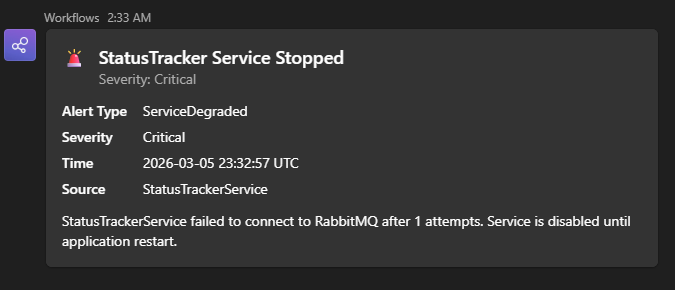
Example Alert Messages
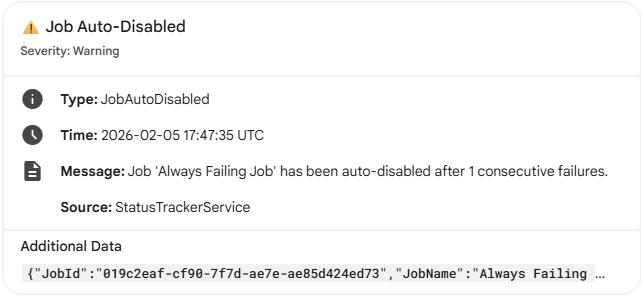
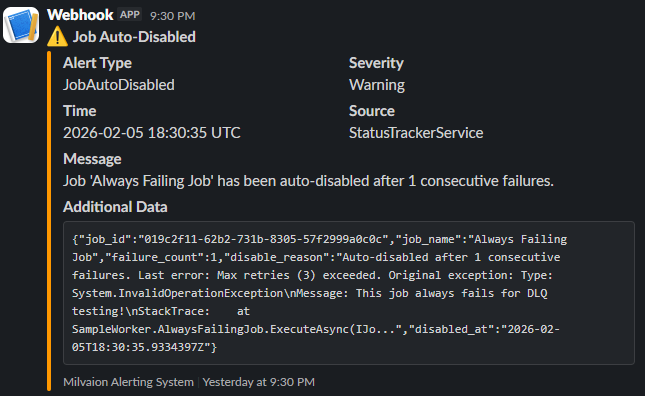
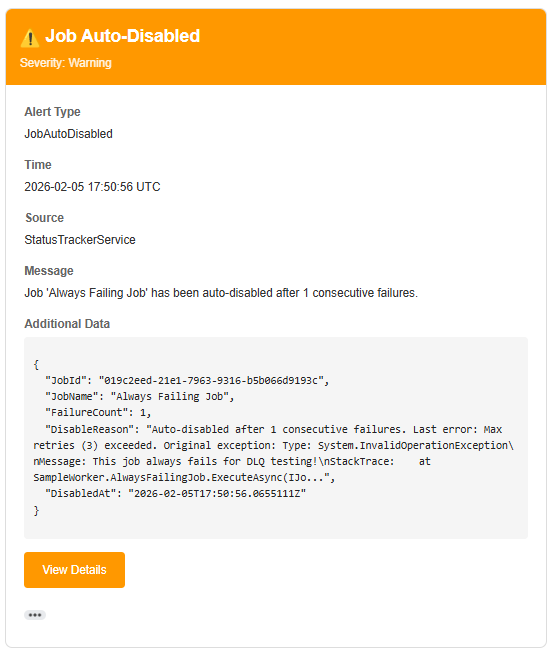
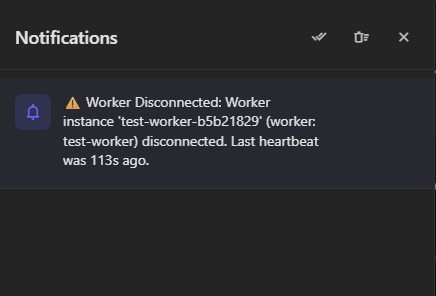
When a job is auto-disabled, you'll receive a card like this:
Google Chat
Slack
Email
Internal
Microsoft Teams
User Notification Preferences
Users can configure which alert types they receive via the dashboard:
| Setting | Description |
|---|---|
| All | Receive all notification types |
| Specific Types | Select individual alert types |
Performance Considerations
- 10-second timeout: All channel operations timeout after 10 seconds
- Parallel delivery: Alerts sent to multiple channels simultaneously
- Error isolation: One channel failure doesn't affect others
- Fire-and-forget: Built-in alerts don't block main processing
Troubleshooting
Alerts Not Sending
- Check channel is enabled:
"Enabled": true - Check production mode: If
SendOnlyInProduction: true, alerts only send whenASPNETCORE_ENVIRONMENT=Production - Check alert routing: Ensure alert type has routes configured
- Check logs: Look for
AlertNotifieror channel-specific log entries in Seq
Google Chat Webhook Errors
Webhook error (403): ...
- Verify webhook URL is correct
- Check if webhook was deleted/regenerated
- Ensure space allows incoming webhooks
Email Not Sending
SMTP authentication failed
- Verify
SenderEmailandSenderPassword - For Gmail: Use App Password (not regular password)
- Verify SMTP host and port
Slack Webhook Errors
invalid_payload
- Verify webhook URL format
- Check if app is still installed in workspace
- Verify channel exists
Teams Webhook Errors
Webhook validation failed
- Verify webhook URL is correct and complete
- Check if the Workflow is still active in Power Automate
- Ensure the Teams channel still exists
- Verify the workflow hasn't been modified or disabled
Security Best Practices
-
Use Kubernetes Secrets: Store webhook URLs and passwords securely
apiVersion: v1
kind: Secret
metadata:
  name: alerting-secrets
type: Opaque
stringData:
SLACK_WEBHOOK: "https://hooks.slack.com/..." -
Rotate webhook URLs: Periodically regenerate webhooks
-
Limit recipients: Only add necessary email recipients
-
Use production-only mode: Enable
SendOnlyInProductionfor external channels