Mutation Testing


In software development, unit tests are an indispensable tool for improving code quality and reliability. But how can we tell if our unit tests are truly effective? This is where Mutation Testing comes into play. In this article, we'll explore the concept of Mutation Testing, how it can be applied manually, and how to automate it using Stryker.NET, a popular tool in the .NET ecosystem.
What is Mutation Testing?
Mutation Testing is a technique used to evaluate the effectiveness of your tests. In this method, small changes (mutations) are made to your code to check whether your tests can catch these changes. If your tests fail to detect these mutations, it indicates that your test scenarios need improvement.
Why is it Important?
- Improves Test Quality: It measures not just whether code is tested, but how effective the tests actually are.
- Enhances Bug Detection: It helps identify potential bugs at an early stage.
- Ensures Reliability: It shows how resilient your code is against changes.
How to Perform Mutation Testing Manually?
You can apply mutation testing principles without using automated tools. In this section, we'll demonstrate how to perform mutation testing manually with a simple example.
First, let's write a simple class and its corresponding unit tests.
MathOperations.cs:
namespace MutationDemo;

public class MathOperations
{
    public int Add(int a, int b) => a + b;
}
Unit Test:
using Xunit;
using FluentAssertions;

namespace MutationDemo.UnitTests;

public class MathOperationsTests
{
    [Fact]
    public void Add_ShouldReturnCorrectSum()
    {
        // Arrange
        var mathOperations = new MathOperations();

        // Act
        var result = mathOperations.Add(2, 3);

        // Assert
        result.Should().Be(5);
    }
}
When we run the test using the dotnet test command in the test project directory, we'll see that our test passes successfully:
Passed! - Failed: 0, Passed: 1, Skipped: 0, Total: 1, Duration: < 1 ms
Now, let's create a mutation by intentionally introducing a bug in our code. For example, let's replace the + operator with the - operator:
public int Add(int a, int b) => a - b;
After saving the changes, run the test again using dotnet test. The test output should be as follows:
Failed! - Failed: 1, Passed: 0, Skipped: 0, Total: 1, Duration: < 1 m
The test failure indicates that our test caught this mutation. We've written a great unit test—our test can detect this bug in the code.
You can also try other possible mutations. For example, we can change return a + b; to return a;:
public int Add(int a, int b) => a;
When you run the tests again, the test should still fail. If the tests pass, it indicates that your tests are not comprehensive enough and you need to review them.
What is Stryker.NET?
While mutation testing can be done manually for small projects, it can be time-consuming and complex for larger projects. This is where Stryker.NET comes in. Stryker.NET is an open-source mutation testing tool developed for the .NET platform. It automatically creates mutations in your code and analyzes whether your tests can catch them.
Features
- Easy Integration: Can be quickly integrated into your existing .NET projects.
- Flexible Configuration: Compatible with different test frameworks (xUnit, NUnit, MSTest).
- Detailed Reporting: Provides detailed reports including mutation scores and which mutations were not detected.
Mutation Testing with Stryker.NET
Let's automate the mutation test we performed manually earlier using Stryker.NET on the same project.
Requirements
-
.NET 6 or newer
-
xUnit for unit tests
-
Stryker.NET installed
To install Stryker.NET as a global tool, run the following command in the terminal:
dotnet tool install -g dotnet-stryker
Running Mutation Testing with Stryker.NET
Run the following command in your test project directory:
dotnet stryker
This command starts mutation testing with Stryker.NET's default settings. After the tests are completed, Stryker.NET will provide you with a report.
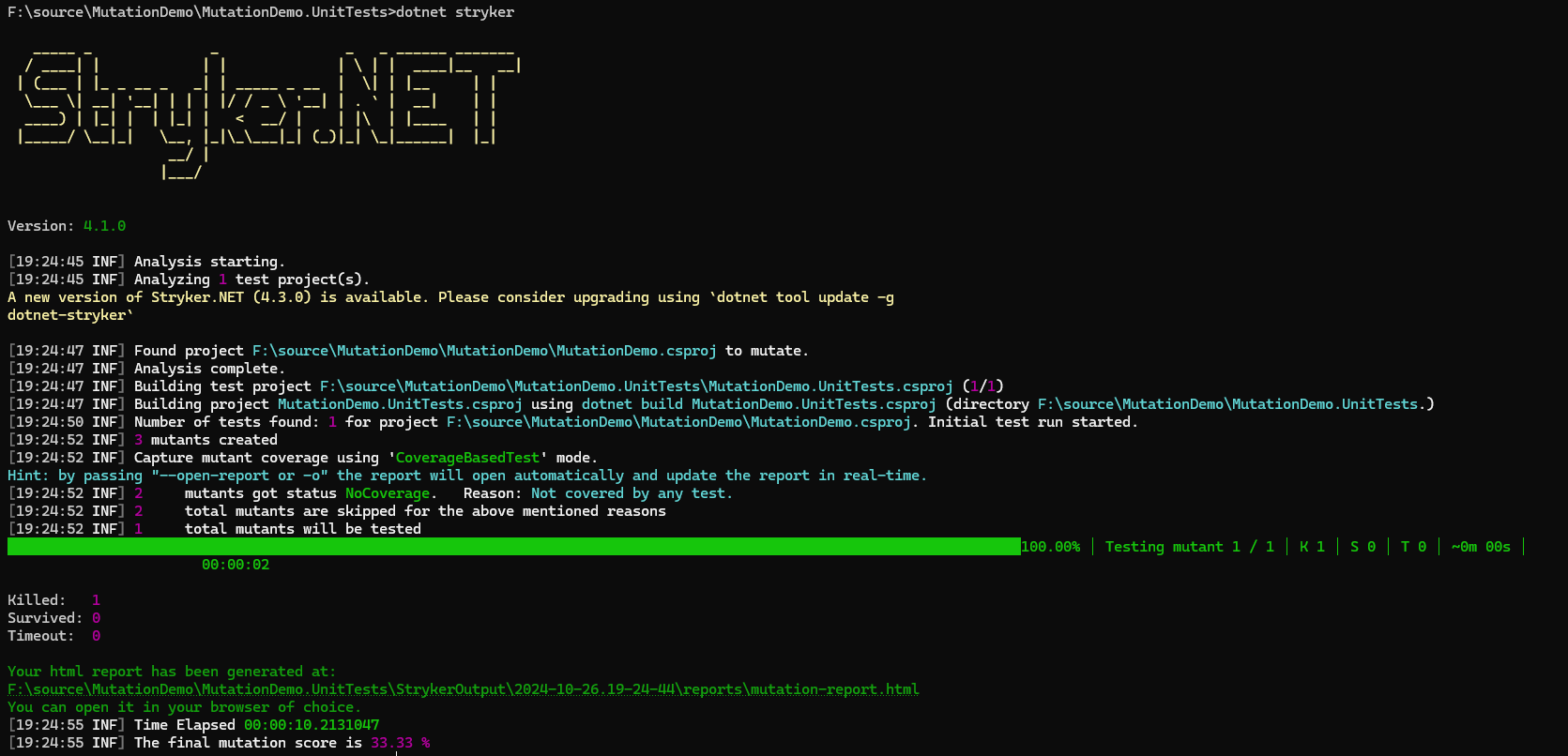
When we examine the html report generated by Stryker, we can see how many mutations Stryker created and in which parts of the code:
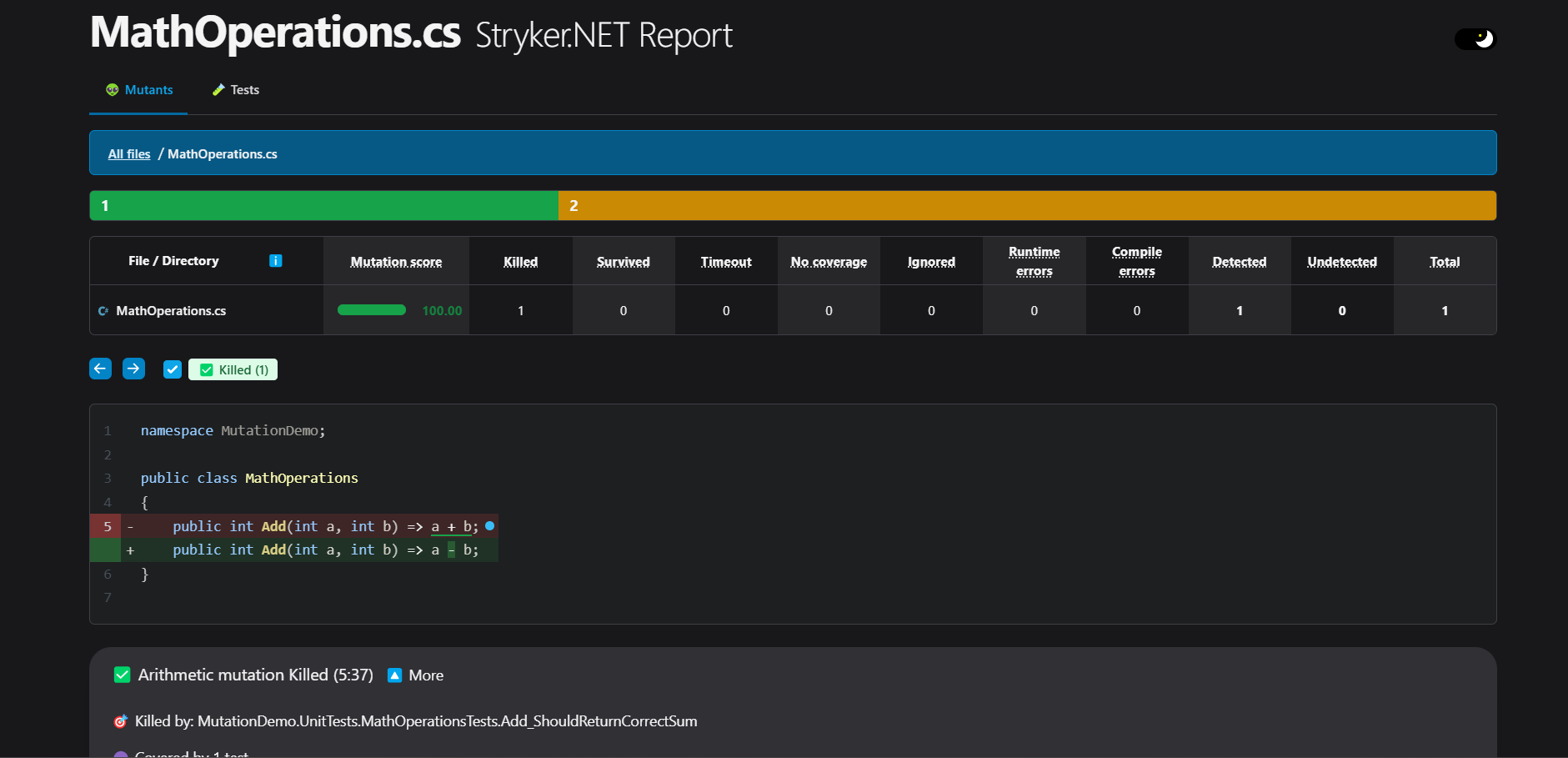
We can see that the mutation score is 100%. This means we've written our tests to cover the changes made to the Add method.
Stryker.NET provides detailed reports on which mutations were killed (caught by tests) and which survived (not caught by tests). By examining these reports, you can identify which scenarios are missing from your tests.
Conclusion
Mutation Testing is a powerful method for understanding whether your unit tests are truly effective. While it can be applied manually, tools like Stryker.NET can automate this process, saving you time and effort. This way, you can improve your code quality and detect potential bugs at an early stage.
Side Note: I can't describe the disappointment I felt when I saw a mutation score of only 40% in my beloved library that contains nearly 2000 tests that I wrote with great effort 😟 If you don't want to experience the same disappointment, you can improve your test writing techniques by examining mutation reports.
See you in the next article…