Monitoring Hangfire and Quartz.NET Without Changing Them

In the previous post I explained why I wrote Milvaion and how its architecture works. I closed with a promise: we'd look at how to add Milvaion's monitoring capabilities without changing your existing scheduler at all.
This post is exactly that. But first, let's talk about why I felt the need to build this in the first place.
Migration Is Genuinely Hard
When you release a new open-source tool, what you're really telling people is: "rip out the working system you have and install mine."
That's not something anyone wakes up wanting to do. Especially not for background jobs. If you have forty jobs that have been running flawlessly in Hangfire for five years, moving all of them for the sake of "a better dashboard" isn't a sensible risk/reward calculation. I wouldn't do it either.
But I also know this: there's an IT Operations team that wants to see what happened when one of those forty jobs failed at 3 a.m., and right now all they have is a Seq query.
These two things don't actually contradict each other. Monitoring and execution are separate concerns. Your jobs can keep running in Hangfire while everything that happens to them collects in Milvaion.
That's what External Scheduler Integration is for.
What It Does and Doesn't Do
Let's be precise, because this distinction matters:
It does:
- List your jobs in the Milvaion dashboard
- Record every run (occurrence) with its status, duration, exception, and which worker it ran on
- Show logs you publish from inside the job, live, under that occurrence
- Include them in metrics: EPM, average duration, success rate, status counters
- Run alert rules — Slack/Teams/email notifications when a job fails
It doesn't:
- Trigger the job. Hangfire or Quartz still owns scheduling.
- Change its cron. That's your scheduler's decision.
- Delete, cancel, or pause the job.
In the dashboard these jobs appear with an external badge, and the Trigger/Delete buttons come disabled. On the edit screen only Milvaion-owned fields are open: display name, description, tags, zombie timeout. Cron, job data, execution timeout, concurrent policy and similar fields are locked — because Milvaion doesn't manage them.
I made that choice deliberately. If you could change the cron from the dashboard but the real value in Hangfire stayed the same, you'd have a field on screen that lies to you. There's nothing worse than a system where two sources of truth disagree.
How Does It Work?
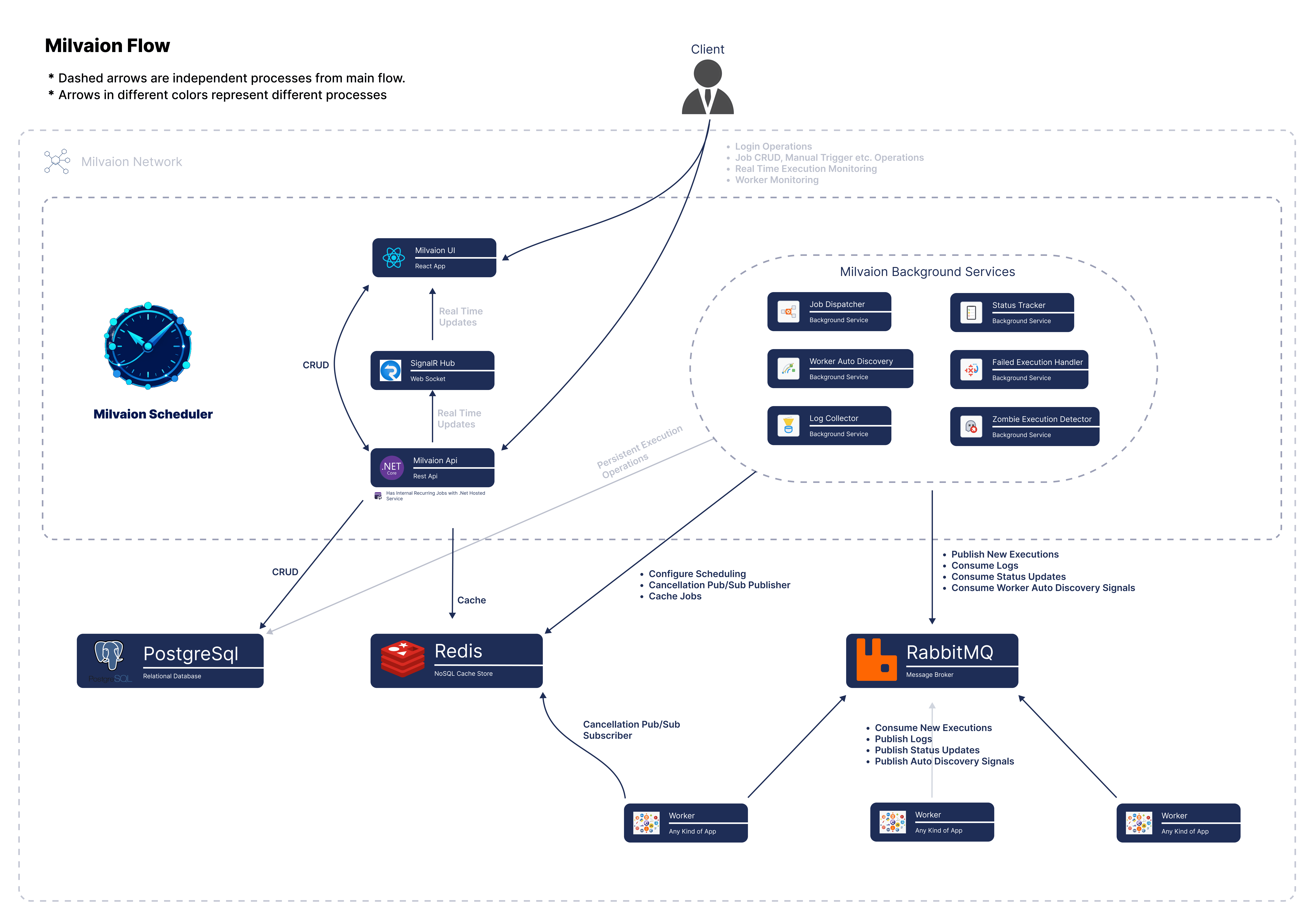
No surprises on the architecture side — it's a shortened version of the flow from the first post.
You add an SDK package to your application. On the Hangfire side that package registers a job filter; on the Quartz side, a job listener. When a job starts and finishes, the filter/listener kicks in and publishes the event to RabbitMQ as a message.
On the Milvaion side, ExternalJobTrackerService consumes those messages: the first time it sees a job it creates a ScheduledJob record flagged IsExternal = true, opens a JobOccurrence for each run, and updates its status, duration, and exception when the work finishes.
Your app (Hangfire/Quartz)

   └── MilvaionJobFilter / MilvaionJobListener

          └── RabbitMQ

                 └── ExternalJobTrackerService (Milvaion API)

                        ├── ScheduledJob (IsExternal = true)

                        ├── JobOccurrence (status, duration, exception)

                        └── Dashboard / Alerts / Metrics
The thing to notice: this flow is one-way. No command travels from Milvaion into your application. That's the answer to why this integration is so low-risk.
What if the integration fails?
I want to address this separately, because it's the first question people ask: "if it can't reach Milvaion, do my jobs stop?"
No. Every method inside the filter is wrapped in try-catch and logs silently on failure:
catch (Exception ex)
{
    LogSafeError(ex, "OnPerforming", context?.BackgroundJob?.Job?.Type?.Name);
}
Message publishing is also fire-and-forget: your job's thread never waits on RabbitMQ. If RabbitMQ is down, the network drops, or the Milvaion API is unavailable, your job keeps running as if nothing happened. The only consequence is that the record for that run doesn't reach the dashboard.
Because you're bolting this onto an existing, working system, the design decision had to be unambiguous: the monitoring layer must never, under any circumstance, affect the execution layer.
Hangfire Integration
Let's get practical. Add the package first:
dotnet add package Milvasoft.Milvaion.Sdk.Worker.Hangfire
Then two lines:
using Hangfire;
using Milvasoft.Milvaion.Sdk.Worker.Hangfire.Extensions;

var builder = Host.CreateApplicationBuilder(args);

// Line 1 — register Milvaion services
builder.Services.AddMilvaionHangfireIntegration(builder.Configuration);

builder.Services.AddTransient<MyEmailJob>();

builder.Services.AddHangfire((sp, config) =>
{
    config.UsePostgreSqlStorage(connectionString);

    // Line 2 — plug the filter into Hangfire
    config.UseMilvaion(sp);
});

builder.Services.AddHangfireServer(options =>
{
    options.WorkerCount = 4;
    options.Queues = ["default", "critical"];
});

await builder.Build().RunAsync();
That's all of it. AddMilvaionHangfireIntegration registers the core worker services (heartbeat, status reporting, log publisher) but not the job consumer — because this worker won't pull work from a queue; it only reports on Hangfire's own jobs. UseMilvaion adds MilvaionJobFilter to GlobalJobFilters.
Not a single line of your job code changes. MyEmailJob stays exactly as it is.
All that's left is configuration:
{
  "Worker": {
    "WorkerId": "hangfire-worker",
    "MaxParallelJobs": 128,
    "RabbitMQ": {
      "Host": "rabbitmq",
      "Port": 5672,
      "Username": "guest",
      "Password": "guest",
      "VirtualHost": "/"
    },
    "Redis": {
      "ConnectionString": "redis:6379"
    },
    "Heartbeat": {
      "Enabled": true,
      "IntervalSeconds": 5
    },
    "ExternalScheduler": {
      "Source": "Hangfire"
    }
  }
}
The ExternalScheduler.Source field is critical. It's how Milvaion knows where these jobs came from, and it's the label they get in the dashboard.
Which events get captured on the Hangfire side?
MilvaionJobFilter implements three separate Hangfire interfaces at once:
| Interface | Method | What happens |
|---|---|---|
IClientFilter | OnCreating / OnCreated | The job is registered with Milvaion (ExternalJobRegistrationMessage) |
IServerFilter | OnPerforming | An occurrence opens; a CorrelationId is generated and written to job parameters |
IServerFilter | OnPerformed | Duration is calculated, status and exception are recorded |
IElectStateFilter | OnStateElection | If the job moves to DeletedState, the occurrence is marked Cancelled |
The CorrelationId generated in OnPerforming is written to Hangfire's job parameters under the name Milvaion_CorrelationId. We'll use it shortly to emit logs.
Quartz.NET Integration
Same story, different attachment point. Quartz has no filters — it has listeners:
dotnet add package Milvasoft.Milvaion.Sdk.Worker.Quartz
using Milvasoft.Milvaion.Sdk.Worker.Quartz.Extensions;
using Quartz;

var builder = Host.CreateApplicationBuilder(args);

builder.Services.AddMilvaionQuartzIntegration(builder.Configuration);

builder.Services.AddQuartz(q =>
{
    // Enable the Milvaion listeners
    q.UseMilvaion();

    var myJobKey = new JobKey("MyJob", "MyGroup");

    q.AddJob<MyJob>(opts => opts.WithIdentity(myJobKey)
                                .WithDescription("My scheduled job"));

    q.AddTrigger(opts => opts.ForJob(myJobKey)
                             .WithIdentity("MyJob-Trigger")
                             .WithCronSchedule("0 0 * * * ?"));
});

builder.Services.AddQuartzHostedService(q => q.WaitForJobsToComplete = true);

await builder.Build().RunAsync();
q.UseMilvaion() registers two listeners:
MilvaionSchedulerListener— registers the defined jobs with Milvaion when the scheduler starts up.MilvaionJobListener— opens an occurrence onJobToBeExecuted, closes it onJobWasExecuted.
On the appsettings.json side the only difference is the Source value:
"ExternalScheduler": {
  "Source": "Quartz"
}
In Quartz the CorrelationId arrives via MergedJobDataMap rather than job parameters.
Live Log Streaming
Everything so far is entirely passive: execution history, durations, and exceptions land in the dashboard without you ever opening your job code.
But in the first post I said the thing that adds the most value is live log streaming. If you want that, it takes a small touch inside the job — you inject ILogPublisher:
using Hangfire.Server;
using Milvasoft.Milvaion.Sdk.Domain.JsonModels;
using Milvasoft.Milvaion.Sdk.Worker.RabbitMQ;

public class SendEmailJob(ILogger<SendEmailJob> logger, ILogPublisher logPublisher)
{
    public async Task ExecuteAsync(PerformContext context, string recipient, CancellationToken ct)
    {
        // Read the tracking info written by the filter
        var correlationIdStr = context.GetJobParameter<string>("Milvaion_CorrelationId");
        var workerId = context.GetJobParameter<string>("Milvaion_WorkerId") ?? "hangfire-worker";
        var correlationId = Guid.TryParse(correlationIdStr, out var cid) ? cid : Guid.Empty;

        await logPublisher.PublishLogAsync(correlationId, workerId, new OccurrenceLog
        {
            Level = "Information",
            Message = $"Sending email to {recipient}",
            Timestamp = DateTime.UtcNow,
            Category = "UserCode"
        });

        await SendAsync(recipient, ct);

        // Flush the buffer before the job finishes
        await logPublisher.FlushAsync(ct);
    }
}
Two things:
- No logs go out without a
CorrelationId. If an emptyGuidarrives, the publisher exits silently. If your logs aren't showing up, this is the first place to look. FlushAsyncis required. Logs are buffered for performance; if you don't flush before the job ends, the last lines can be lost.
Admittedly, this isn't as elegant as context.LogInformation(...) in Milvaion's own IAsyncJob. But passive monitoring requires nothing from you at all; log streaming is an optional step up. That's exactly the gradual-adoption idea.
The Quick Way to Try It
If you want to see it without touching your own project, there are pre-built images:
services:
  hangfire-worker:
    image: milvasoft/milvaion-sample-hangfire-worker:latest
    environment:
      - Worker__WorkerId=hangfire-worker-1
      - Worker__RabbitMQ__Host=rabbitmq
      - Worker__Redis__ConnectionString=redis:6379
      - Worker__ExternalScheduler__Source=Hangfire
    depends_on: [rabbitmq, redis]

  quartz-worker:
    image: milvasoft/milvaion-sample-quartz-worker:latest
    environment:
      - Worker__WorkerId=quartz-worker-1
      - Worker__RabbitMQ__Host=rabbitmq
      - Worker__Redis__ConnectionString=redis:6379
      - Worker__ExternalScheduler__Source=Quartz
    depends_on: [rabbitmq, redis]
Bring Milvaion up with docker compose up -d, add these, and look at the dashboard. The sample workers contain demo jobs that run every few seconds, so you'll see movement immediately.
Three Common Problems
Jobs don't show up in the dashboard at all.
Check the RabbitMQ connection first (docker logs <worker> | grep -i rabbitmq), then make sure ExternalScheduler.Source is set. If it's empty, the filter returns early.
The job appears but occurrences hang in Running.
It means the OnPerformed / JobWasExecuted message never arrived. That's normal if the application shut down mid-job — Milvaion's zombie detection will move these to Failed after a while. Zombie timeout is one of the few fields you can edit on external jobs, precisely for this reason.
Logs aren't streaming.
Is ILogPublisher injected, is CorrelationId actually populated, was FlushAsync called? If any one of the three is missing, no logs appear.
What Does This Integration Actually Solve?
To be honest, there's nothing technically brilliant here. A filter, a listener, a few RabbitMQ messages. The code itself is one of the simplest parts of Milvaion.
But as a product decision, it's the piece I thought about the most.
Because Milvaion's real competitor isn't Hangfire or Quartz — it's doing nothing. Most people look at a new tool, say "that's nice," and close the tab, because the cost of trying it looks higher than the payoff of a dashboard. If you can see the result in two lines of code without putting any part of your existing system at risk, that calculation changes.
The rest is organic: you monitor in external mode for a while, get used to the dashboard, set up your alerts. One day when you need to write a new job, maybe you write it as an IAsyncJob. Maybe you never do, and Milvaion just stays an observability layer for you. Both are acceptable outcomes as far as I'm concerned.
Milvaion is open source on GitHub under Apache 2.0. For the full details of the external scheduler integration, take a look at the documentation.
See you in the next one…